

Automatically Offboard Team Members from NetBird
Updated
NetBird's IdP-Sync integration simplifies offboarding team members, enhancing security and efficiency. With this integration, you can automatically revoke access when users leave the company, when temporary access for a freelancer ends after project completion, or when a seasonal employee's contract concludes. Likewise, you can use this integration to restrict access to specific resources or environments when a project finishes. For instance, you can limit network and resource access when a team member is removed from a group or when an entire group is deleted from your Identity Provider.
Automatic removal applies to users managed by the IdP-Sync integration. SCIM does not manage users created or invited directly in NetBird; remove those users manually in NetBird when offboarding. Group-based access revocation also depends on the user group propagation setting.
Removing Team Members
This tutorial uses three example users with the following memberships in NetBird's Users page:
| Users | Group |
|---|---|
user_01 | IT Administrators |
user_02, user_03 | Staging |
To get started, access your Identity Provider (IdP) dashboard. For this example, we'll use Microsoft Entra ID (Azure AD).
In your IdP's user management section, select user_01 and click Delete to revoke that user's access.
After deletion, click the Refresh button to confirm that the user is no longer active.
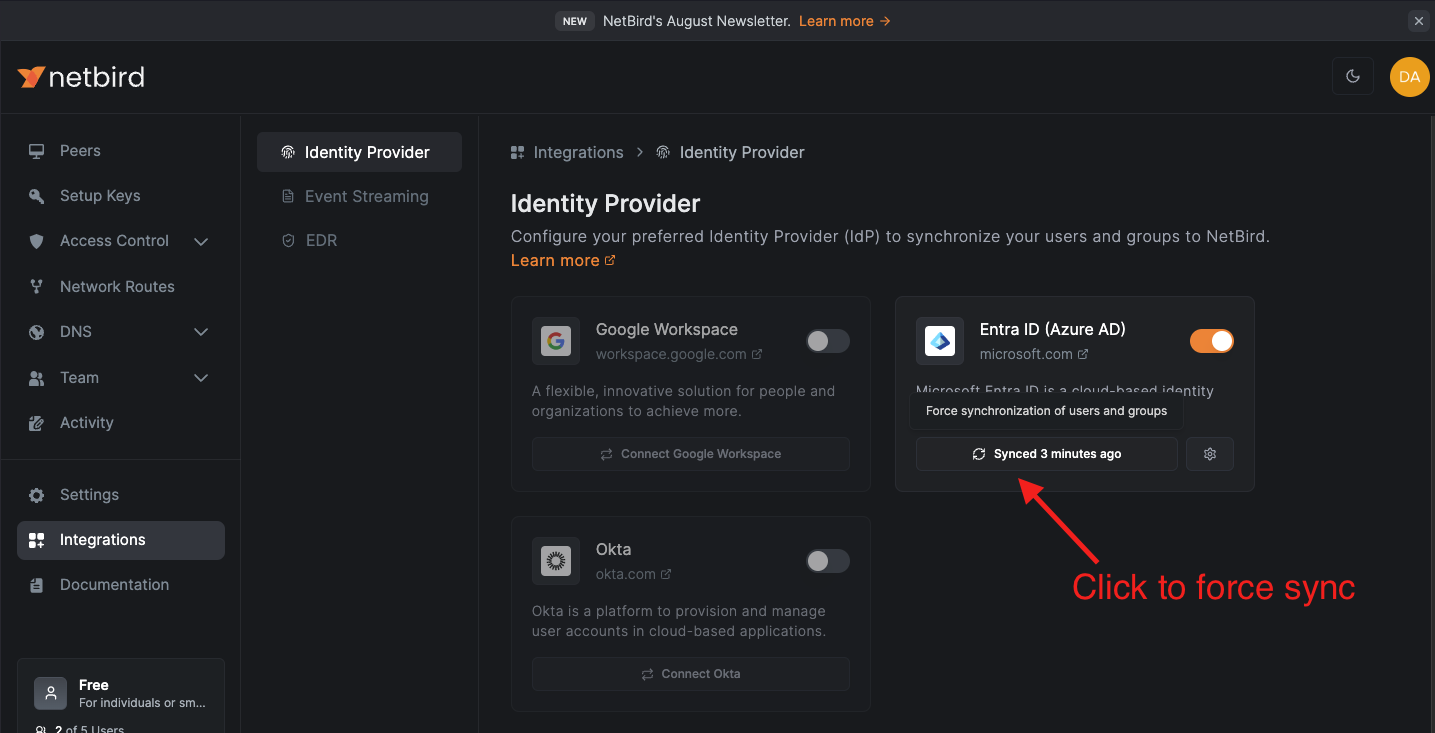
For the Entra ID API integration used in this example, wait for the next synchronization cycle, which usually takes 300 seconds. Alternatively, go to Integrations in the NetBird dashboard, open the Identity Provider Sync tab, and trigger the synchronization manually.
Manual sync in NetBird is only available for the API-based integrations, Google Workspace and Microsoft Entra ID via API. SCIM-based integrations send changes from the IdP on the provider's provisioning schedule. For example, Entra ID (SCIM) normally runs approximately every 40 minutes after the initial sync. To request an earlier update, use your IdP's on-demand provisioning option if it provides one. Confirm that the user has been removed in NetBird before treating offboarding as complete.
Now, go to NetBird's Users dashboard to verify that the user is no longer listed.
Revoking Group Access
For changes to a user's IdP group memberships to update their peers, Enable user group propagation must be enabled in Settings > Groups. When it is disabled, peers retain their existing group memberships, even after the user's groups change. Update the peer memberships manually in NetBird to revoke access granted through those groups.
Imagine a scenario where you have an access policy that grants all members of the Staging group access to resources in the Servers group.
Let's say the current project is finished, and you no longer want members of the Staging group to have access to the
Servers group. One way to do this is to remove the Staging group from your IdP.
Once the changes synchronize in NetBird, verify that the affected peers no longer belong to the Staging group and no longer have network access through that group. If peer memberships remain, remove them manually before treating the revocation as complete.