

Migration Guide: Enable Reverse Proxy Feature
Updated
This guide walks you through adding the NetBird Reverse Proxy to an existing self-hosted deployment. By the end, you'll have a netbird-proxy container running alongside your existing services, ready to expose internal applications to the public internet.
Who is this guide for? This migration guide is for existing self-hosted users who:
- Already have a working NetBird deployment (management server, dashboard, signal, relay)
- Want to enable the Reverse Proxy feature to expose internal services publicly
- Are running their services via Docker Compose
Why Traefik is required
The NetBird proxy container manages its own TLS certificates (via Let's Encrypt or static files). This means the reverse proxy sitting in front of it must not terminate TLS - it needs to pass raw TLS connections through to the proxy container untouched.
This capability is called TLS passthrough, and among common reverse proxies, only Traefik supports it via its TCP routers. Other reverse proxies (Nginx, Caddy, Nginx Proxy Manager) terminate TLS themselves and cannot forward the raw encrypted connection, which breaks the proxy's certificate management.
If your current deployment uses a reverse proxy other than Traefik, you'll need to switch before enabling this feature. See Switching to Traefik for instructions.
Overview of changes
What you're adding
proxyservice (container:netbird-proxy) - a new service in your Docker Compose stack that handles TLS termination, certificate provisioning, and traffic forwarding for reverse proxy servicesproxy.envfile - environment variables for the proxy container, including domain, token, and ACME configuration- Traefik TCP labels - routing rules that tell Traefik to pass TLS connections through to the proxy container
- Wildcard DNS record - so that all service subdomains (e.g.,
myapp.proxy.example.com) resolve to your server - Proxy access token - generated via the management CLI, used by the proxy to authenticate with the management server
What stays the same
- Your existing NetBird services are unchanged
- Your configuration files (
config.yamlfor combined setup,management.jsonfor multi-container setup) require no modifications - unless you use an external identity provider (not the embedded IdP). See Configure SSO for external identity providers below. - Existing peers, networks, and access policies are unaffected
Prerequisites
Before starting, ensure you have:
- Traefik as your reverse proxy (see Why Traefik is required above)
- Latest NetBird images - pull the latest version to ensure the management server and CLI support the reverse proxy feature and token creation
- A domain for the proxy - preferably a dedicated domain such as
proxy.example.com. It can share the NetBird server's domain, but that base hostname remains reserved for the dashboard and management server. Proxied services must use subdomains (e.g.,myapp.netbird.example.com) - Wildcard DNS capability - ability to create a wildcard record such as
*.proxy.example.compointing to your server - Port 443 accessible - the proxy needs this for ACME TLS-ALPN-01 challenges (certificate provisioning)
- The server can reach its own public IP - the proxy runs its own NetBird client, and that client connects to Signal and the relay at your NetBird domain's public address, even when the proxy reaches the management server over the Docker network. If the firewall in front of the server does not route a connection from the server back to its own public IP (hairpin NAT), every proxied service returns
504 Gateway Timeoutand the proxy logsfailed connecting to Signal Service. Resolving the NetBird domain to an internal address instead (split DNS) keeps the services working, but every connection between the proxy and your peers then goes through the relay
This guide covers both the combined container setup (netbirdio/netbird-server, the default for new deployments) and the multi-container setup (separate management, signal, and relay images). Where commands or configuration differ between the two setups, both variants are shown.
Migration steps
Step 1: Backup current configuration
# Create a backup directory
mkdir -p netbird-backup-$(date +%Y%m%d)
cd netbird-backup-$(date +%Y%m%d)

# Backup configuration files
cp ../docker-compose.yml .
cp ../config.yaml . 2>/dev/null       # Combined container setup
cp ../management.json . 2>/dev/null   # Multi-container setup
cp ../*.env . 2>/dev/null || echo "No .env files found"
Step 2: Generate a proxy access token
The proxy authenticates with the management server using an access token. Generate one using the server CLI.
Combined container (netbirdio/netbird-server):
docker exec -it netbird-server \
  /go/bin/netbird-server --config /etc/netbird/config.yaml admin token create \
  --name "my-proxy"
<netbird-data-dir> is usually /etc/netbird.
Multi-container (separate netbirdio/management image):
docker exec -it netbird-management \
  /go/bin/netbird-mgmt admin token create --name "my-proxy"
This outputs a token in the format nbx_... (40 characters). Save the token immediately - it is only displayed once. The management server stores only a SHA-256 hash. Make sure not to accidentally copy the 20-character Token ID instead.
You can manage tokens later with:
# List all tokens (combined container)
docker exec -it netbird-server \
  /go/bin/netbird-server --config /etc/netbird/config.yaml admin token list

# List all tokens (multi-container)
docker exec -it netbird-management /go/bin/netbird-mgmt admin token list

# Revoke a token by ID (combined container)
docker exec -it netbird-server \
  /go/bin/netbird-server --config /etc/netbird/config.yaml admin token revoke <token-id>

# Revoke a token by ID (multi-container)
docker exec -it netbird-management /go/bin/netbird-mgmt admin token revoke <token-id>
Step 3: Add the proxy service to docker-compose.yml
Add the following service to your docker-compose.yml. Adjust the depends_on value to match your management service name:
proxy:
  image: netbirdio/reverse-proxy:latest
  container_name: netbird-proxy
  restart: unless-stopped
  networks: [netbird]
  depends_on:
    - netbird-server  # Use "management" for multi-container setup
  env_file:
    - ./proxy.env
  volumes:
    - netbird_proxy_certs:/certs
  labels:
    - traefik.enable=true
    - traefik.tcp.routers.proxy-passthrough.entrypoints=websecure
    - traefik.tcp.routers.proxy-passthrough.rule=HostSNI(`*`) && !HostSNI(`netbird.example.com`)
    - traefik.tcp.routers.proxy-passthrough.tls.passthrough=true
    - traefik.tcp.routers.proxy-passthrough.service=proxy-tls
    - traefik.tcp.routers.proxy-passthrough.priority=1
    - traefik.tcp.services.proxy-tls.loadbalancer.server.port=8443
    - traefik.tcp.services.proxy-tls.loadbalancer.serverstransport=pp-v2@file
  logging:
    driver: "json-file"
    options:
      max-size: "500m"
      max-file: "2"
Also add the netbird_proxy_certs volume to your volumes: section:
volumes:
  # ...existing volumes...
  netbird_proxy_certs:
Then create a proxy.env file with the proxy configuration.
Combined container (netbirdio/netbird-server):
NB_PROXY_DOMAIN=proxy.example.com
NB_PROXY_TOKEN=nbx_your_token_here
NB_PROXY_MANAGEMENT_ADDRESS=http://netbird-server:80
NB_PROXY_ALLOW_INSECURE=true
NB_PROXY_ADDRESS=:8443
NB_PROXY_ACME_CERTIFICATES=true
NB_PROXY_ACME_CHALLENGE_TYPE=tls-alpn-01
NB_PROXY_CERTIFICATE_DIRECTORY=/certs
NB_PROXY_FORWARDED_PROTO=https
NB_PROXY_PROXY_PROTOCOL=true
NB_PROXY_TRUSTED_PROXIES=172.30.0.0/24
Multi-container (separate netbirdio/management image):
NB_PROXY_DOMAIN=proxy.example.com
NB_PROXY_TOKEN=nbx_your_token_here
NB_PROXY_MANAGEMENT_ADDRESS=http://management:33073
NB_PROXY_ALLOW_INSECURE=true
NB_PROXY_ADDRESS=:8443
NB_PROXY_ACME_CERTIFICATES=true
NB_PROXY_ACME_CHALLENGE_TYPE=tls-alpn-01
NB_PROXY_CERTIFICATE_DIRECTORY=/certs
NB_PROXY_FORWARDED_PROTO=https
NB_PROXY_PROXY_PROTOCOL=true
NB_PROXY_TRUSTED_PROXIES=172.30.0.0/24
The proxy connects to the management server directly over the Docker network rather than through Traefik; this avoids the need to route the /management.ProxyService/ gRPC service through your reverse proxy. The NB_PROXY_ALLOW_INSECURE=true setting is safe here because the traffic never leaves the Docker network.
If your proxy and management server run on separate hosts and cannot communicate over a shared Docker network, see Connecting through Traefik below.
Preserve client IP addresses through Traefik
Replace 172.30.0.0/24 in NB_PROXY_TRUSTED_PROXIES with the subnet of the Docker network shared by Traefik and the proxy. 172.30.0.0/24 is the subnet used by the current NetBird quickstart, but an existing deployment may use a different subnet.
To find the network name and subnet, run:
# Replace netbird-traefik if your Traefik container has a different name
docker inspect netbird-traefik \
  --format '{{range $name, $_ := .NetworkSettings.Networks}}{{println $name}}{{end}}'

docker network inspect <network-name> \
  --format '{{range .IPAM.Config}}{{println .Subnet}}{{end}}'
Do not copy a single Traefik container IP unless that address is assigned statically in docker-compose.yml. Docker can assign a different container IP after recreation. Trusting the actual Docker subnet keeps the configuration valid across container updates.
The PROXY protocol settings preserve the original client IP across Traefik's TCP passthrough. This is required for accurate access logs, CIDR and country restrictions, and CrowdSec decisions.
Traefik must send PROXY protocol v2 to the proxy. Enable Traefik's file provider by adding this argument to the Traefik service's command: section:
- "--providers.file.filename=/etc/traefik/dynamic.yaml"
Add this mount to the Traefik service's volumes: section:
- ./traefik-dynamic.yaml:/etc/traefik/dynamic.yaml:ro
Create traefik-dynamic.yaml next to docker-compose.yml:
tcp:
  serversTransports:
    pp-v2:
      proxyProtocol:
        version: 2
If your Traefik deployment already uses the file provider, add the pp-v2 TCP servers transport to its existing dynamic configuration instead of configuring a second file provider.
The Traefik labels configure a TCP router that:
- Catches TLS requests via
HostSNI(*)except the explicitly excluded HTTP hostnames - Uses the
websecureentrypoint (port 443) - Passes the TLS connection through without termination (
tls.passthrough=true) - Uses
priority=1so more specific TCP routers can take precedence - Forwards traffic to the proxy container on port 8443
Traefik evaluates TCP routers before HTTP routers. A HostSNI(*) TCP router therefore also matches the hostname used by the NetBird dashboard and management server. The example rule excludes netbird.example.com; replace it with your management hostname. Add another && !HostSNI(...) clause for every additional HTTP hostname on the same Traefik entrypoint.
- traefik.tcp.routers.proxy-passthrough.rule=HostSNI(`*`) && !HostSNI(`netbird.example.com`)
Exposing L4 ports
The Traefik configuration above only routes port 443 to the proxy container. HTTP and TLS services work over this port automatically (via SNI routing), but TCP and UDP services listen on dedicated ports that need to be exposed separately.
If you plan to use L4 services (TCP or UDP mode), add ports entries directly to the proxy service in your docker-compose.yml for each port you want to expose. These ports should be mapped on the proxy container itself, not through Traefik, since routing them through Traefik would add an unnecessary extra hop:
proxy:
  # ...existing configuration...
  ports:
    - "5432:5432/tcp"    # Example: PostgreSQL
    - "3306:3306/tcp"    # Example: MySQL
    - "5353:5353/udp"    # Example: DNS
Each entry maps a host port to the same port inside the container. Add or remove entries as you create or delete L4 services. After changing the ports, apply with:
docker compose up -d proxy
You only need port mappings for TCP and UDP mode services. HTTP and TLS mode services are routed through port 443 via Traefik and do not require additional port entries.
Changing ports recreates the proxy container, which briefly interrupts every service it serves, not only the new one. To add L4 services without that step, run the proxy on the host network instead.
Use host networking instead
With host networking, the proxy binds each L4 listen port on the server itself, so a new TCP or UDP service is reachable as soon as you create it, with no compose change and no restart. The server's firewall then decides which ports are reachable, so open each listen port there as you add its service. The port mappings above remain the default: host networking gives up Docker's port isolation, and here the proxy shares the host's network with your NetBird server and Traefik.
Two settings must change with it, because the proxy is no longer on the netbird Docker network:
- The management address.
http://netbird-server:80(orhttp://management:33073in a multi-container setup) is a Docker network name, which a container on the host network cannot resolve; the proxy logsname resolver error: produced zero addressesand never connects. Inproxy.env, setNB_PROXY_MANAGEMENT_ADDRESSto your public NetBird URL, for examplehttps://netbird.example.com:443. This connection goes through Traefik, so Traefik must route/management.ProxyService/and allow long-lived gRPC streams. Deployments from the current installer already do; for older ones, apply steps 1 and 3 of Connecting through Traefik instead of Docker network. - How Traefik reaches the proxy. For a container on the host network, Traefik dials
127.0.0.1:8443, which inside Traefik's own container is Traefik itself, so every HTTP service fails withconnection refused. Mappinghost.docker.internalto the host in Traefik's service makes it reach the proxy on the host instead.
In docker-compose.yml, remove the networks and ports entries from the proxy service, then add:
proxy:
  # ...existing configuration, without networks: and ports:...
  network_mode: host

traefik:
  # ...existing configuration...
  extra_hosts:
    - host.docker.internal:host-gateway
Apply both with docker compose up -d proxy traefik. The proxy's main port stays 8443, which an unprivileged process can bind on the host. An L4 listen port below 1024 needs the host's unprivileged port floor lowered first; see Bring Your Own Proxy.
Step 4: Set up DNS records
Create DNS records pointing to the server running your NetBird stack: one for the base proxy domain and one wildcard for service subdomains.
| Type | Name | Content |
|---|---|---|
A or AAAA | proxy.example.com | Your server's public IP address |
CNAME | *.proxy.example.com | proxy.example.com |
Use one domain consistently in both rows. For example, if NB_PROXY_DOMAIN=proxy.example.com, create proxy.example.com and *.proxy.example.com. You can use a CNAME for the base domain instead of A/AAAA when your DNS provider supports the required target. The base domain record is required because a wildcard record does not cover the bare domain itself.
Step 5: Apply changes
# Pull the new image
docker compose pull proxy

# Start the proxy alongside existing services
docker compose up -d

# Verify all services are running
docker compose ps

# Check proxy logs
docker compose logs -f proxy
You should see log messages indicating the proxy has connected to the management server and is ready to serve traffic.
Step 6: Verify in the dashboard
Once the proxy connects to the management server:
- Open your NetBird dashboard
- Navigate to Reverse Proxy > Services
- Click Add Service
- In the domain selector, you should see your proxy domain (e.g.,
proxy.example.com) with a Cluster badge
If the domain appears, the proxy is connected and ready. You can now create your first service.
Step 7 (optional): Enable CrowdSec IP reputation
CrowdSec is an open-source security engine that shares threat intelligence across its community network. When integrated with the NetBird Proxy, it checks every incoming client IP against a local cache of known malicious addresses and blocks them before they reach your services. This step is entirely optional.
Already have the proxy running? If you completed steps 1-6 previously and are coming back to add CrowdSec, start here. The instructions below work whether you're setting up the proxy for the first time or adding CrowdSec to an existing proxy deployment.
A CrowdSec LAPI (Local API) container runs alongside your deployment, syncs decisions from community blocklists, and exposes them to the proxy via a stream bouncer. The proxy supports two enforcement modes per service:
| Mode | Behavior |
|---|---|
| enforce | Blocked IPs are denied immediately. If the bouncer is not yet synced, connections are denied (fail-closed). |
| observe | Blocked IPs are logged but not denied. Use this to evaluate CrowdSec before enforcing. |
7a. Add the CrowdSec container
Add the following service to your docker-compose.yml:
  crowdsec:
    image: crowdsecurity/crowdsec:v1.8.1
    container_name: netbird-crowdsec
    restart: unless-stopped
    networks: [netbird]
    environment:
      COLLECTIONS: crowdsecurity/linux
    volumes:
      - ./crowdsec:/etc/crowdsec
      - crowdsec_db:/var/lib/crowdsec/data
    healthcheck:
      test: ["CMD", "cscli", "lapi", "status"]
      interval: 10s
      timeout: 5s
      retries: 15
    labels:
      - traefik.enable=false
    logging:
      driver: "json-file"
      options:
        max-size: "500m"
        max-file: "2"
Add crowdsec_db: to the top-level volumes: section, and update the proxy's depends_on so it waits for CrowdSec to be healthy:
  proxy:
    depends_on:
      netbird-server:
        condition: service_started
      crowdsec:
        condition: service_healthy
If you installed the proxy using an older version of this guide, confirm that its configuration preserves the original client IP. CrowdSec cannot make correct decisions if every request appears to come from Traefik.
7b. Start CrowdSec and register a bouncer
mkdir -p crowdsec
docker compose up -d crowdsec
Wait for the container to become healthy:
docker compose exec crowdsec cscli lapi status
Then register a bouncer:
docker compose exec crowdsec cscli bouncers add netbird-proxy -o raw
This prints a single API key. Copy it.
7c. Configure the proxy
Add these lines to proxy.env:
NB_PROXY_CROWDSEC_API_URL=http://crowdsec:8080
NB_PROXY_CROWDSEC_API_KEY=<bouncer-key-from-above>
Then restart the proxy:
docker compose up -d proxy
At this point the proxy logs will not mention CrowdSec yet:
docker compose logs proxy | grep -i crowdsec
Empty output here is expected. The stream bouncer is started lazily: it does not connect to the LAPI until at least one service has CrowdSec enabled in step 7d.
To confirm the proxy picked up the configuration, check that the cluster now advertises CrowdSec support instead:
curl -s -H "Authorization: Token <your-pat>" \
  https://<your-domain>/api/reverse-proxies/clusters | jq '.[].supports_crowdsec'
This should return true. In the dashboard, the equivalent check is that a CrowdSec IP Reputation dropdown now appears on the Access Control tab of a reverse proxy service.
7d. Enable per service
CrowdSec must be enabled individually on each service through the dashboard under Access Control. Set the CrowdSec mode to enforce or observe.
Once the first service is set to enforce or observe, the bouncer starts and the proxy logs the connection:
docker compose logs proxy | grep -i crowdsec
netbird-proxy  | INFO proxy/internal/crowdsec/bouncer.go:70: connecting to CrowdSec LAPI at http://crowdsec:8080
netbird-proxy  | INFO proxy/internal/crowdsec/registry.go:94: CrowdSec bouncer started
netbird-proxy  | INFO proxy/internal/crowdsec/bouncer.go:187: CrowdSec bouncer synced initial decisions
The bouncer re-polls the LAPI every 10 seconds. You can confirm from the CrowdSec side with cscli bouncers list, which shows a recent Last API pull for netbird-proxy.
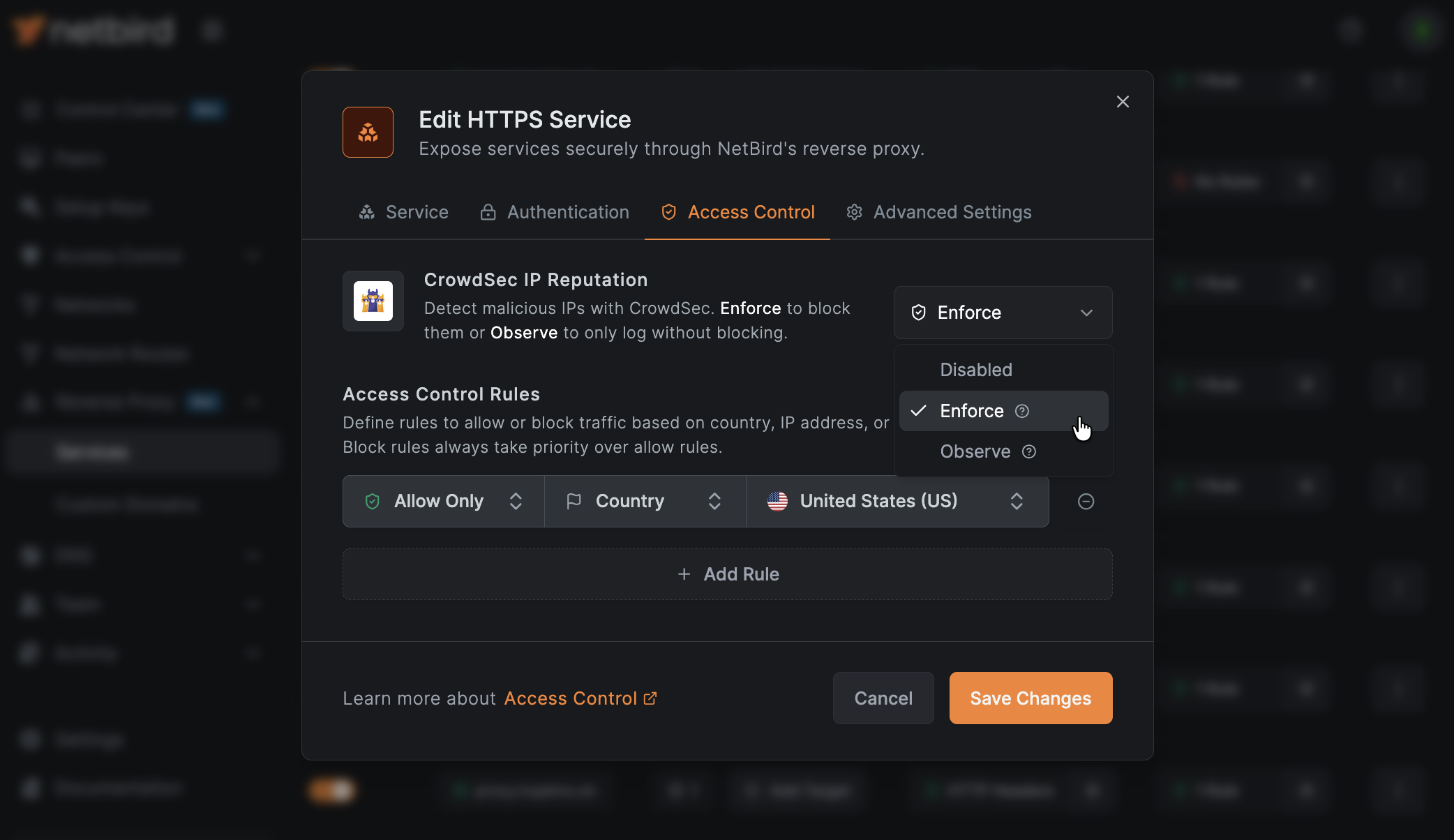
In enforce mode, if the bouncer has not completed its initial sync with the LAPI, all connections to that service will be denied. This is by design (fail-closed). If you want to avoid this during initial rollout, start with observe mode.
7e. Enroll in CrowdSec Console (optional)
The CrowdSec Console gives you a web dashboard to monitor decisions, manage alerts, and subscribe to premium blocklists. Enrollment is optional: the community blocklists work without it.
docker compose exec crowdsec cscli console enroll <your-enrollment-key>
Get your enrollment key at app.crowdsec.net.
CrowdSec environment variables
| Variable | Description |
|---|---|
NB_PROXY_CROWDSEC_API_URL | CrowdSec LAPI URL. Example: http://crowdsec:8080. Empty disables CrowdSec. |
NB_PROXY_CROWDSEC_API_KEY | Bouncer API key generated by cscli bouncers add. |
CrowdSec troubleshooting
Bouncer not connecting: Check that the CrowdSec container is healthy and reachable from the proxy container:
docker compose exec proxy wget -qO- http://crowdsec:8080/v1/decisions/stream --header "X-Api-Key: <your-key>" 2>&1 | head
If this fails, verify both containers are on the same Docker network.
All connections denied after enabling enforce mode: This typically means the bouncer has not completed its initial sync. Check the proxy logs for the CrowdSec bouncer synced initial decisions message. If it's missing, the LAPI may be unreachable or the API key may be incorrect. Switch to observe mode on affected services until the issue is resolved.
Note that the message is only expected after a service has CrowdSec enabled (step 7d). Its absence before that point is normal and does not indicate a problem.
No decisions on a new installation: a freshly registered CrowdSec instance receives an empty community blocklist and pulls the full list on its next scheduled sync, up to two hours later. The startup logs state this directly:
capi/community-blocklist : received 0 new entries (expected if you just installed crowdsec)
Start pull from CrowdSec Central API (interval: 1h59m7s once, then 2h0m0s)
Until that first pull completes, a service in enforce mode has nothing to enforce and traffic passes normally. Use a manual decision (below) to verify enforcement immediately, since local decisions apply straight away.
Checking active decisions:
# List locally-generated and manually-added decisions
docker compose exec crowdsec cscli decisions list

# List community blocklist decisions (hidden from the default view)
# --limit bounds alerts, not decisions, so pipe through head
docker compose exec crowdsec cscli decisions list --origin CAPI | head -20

# Ban an IP for 1 hour (for testing)
docker compose exec crowdsec cscli decisions add --ip 1.2.3.4 --duration 1h --reason "manual test"

# Remove all decisions for an IP
docker compose exec crowdsec cscli decisions delete --ip 1.2.3.4
cscli decisions list excludes CAPI-sourced decisions by default, so it can report a handful of entries while the engine holds thousands. To size the blocklist, read the cs_active_decisions gauge, which is reported per origin/reason/action combination rather than as a single total:
docker compose exec crowdsec sh -c "wget -qO- http://127.0.0.1:6060/metrics" | grep '^cs_active_decisions'
cscli decisions delete --all removes every decision including the entire synced community blocklist. Restarting CrowdSec may not immediately re-fetch it: startup attempts a pull, but the request is skipped if the previous CAPI pull was recent, leaving restoration to the next scheduled pull up to two hours later. The instance runs without community reputation data until then. Prefer --ip for targeted removals.
Configure SSO for external identity providers
Who this applies to
This section applies to multi-container deployments using a standalone external identity provider (Auth0, Okta, Keycloak, Zitadel, etc.) instead of the built-in embedded IdP (Dex). If you are running the combined container or deployed using the quickstart script with default settings, you are using the embedded IdP and can skip this section - the callback is registered automatically.
Why this is needed
The reverse proxy SSO feature authenticates users through an OAuth2/OIDC flow that redirects through a callback endpoint on the management server (/api/reverse-proxy/callback). The embedded IdP registers this callback automatically, but external IdPs need it configured manually. Without this configuration, SSO authentication on reverse proxy services will silently fail.
Option A: Quick fix (keep your external IdP)
If you want to keep using your current external identity provider, follow these three steps:
Step 1: Add callback URL to management.json (multi-container only)
Add the AuthCallbackURL and AuthClientID fields to the HttpConfig section of your management.json:
"HttpConfig": {
  ...existing fields...,
  "AuthClientID": "<your-auth-client-id>",
  "AuthCallbackURL": "https://<your-management-domain>/api/reverse-proxy/callback"
}
Replace <your-management-domain> with your NetBird management server domain (the same domain used for the dashboard). Replace <your-auth-client-id> with the OAuth2 client ID from your identity provider (the same client ID used for the dashboard application).
Step 2: Register callback in your IdP
In your identity provider's application settings, add the following URL as an allowed redirect URI / callback URL:
https:///api/reverse-proxy/callback
This is in addition to any existing redirect URIs (like /auth or /silent-auth).
Where to find this setting in common providers:
| Provider | Where to add the redirect URI |
|---|---|
| Auth0 | Application > Settings > Allowed Callback URLs |
| Okta | Application > General > Login redirect URIs |
| Keycloak | Client > Settings > Valid redirect URIs |
| Zitadel | Application > Redirect Settings > Redirect URIs |
| Generic OIDC | Refer to your provider's documentation |
Step 3: Restart management server
Restart the management service to pick up the configuration change:
docker compose restart management
Option B: Migrate to the embedded IdP (recommended)
The embedded IdP (Dex) handles the reverse proxy callback registration automatically - no manual configuration needed. If you want a simpler setup, consider migrating to the embedded IdP.
With the embedded IdP, external identity providers can still be used as connectors alongside local authentication. This means your users can continue to sign in with their existing accounts (Google, Okta, Keycloak, etc.) while the embedded IdP manages the OIDC layer.
See the Identity Providers page for instructions on adding external IdPs as connectors.
Migrating from a standalone external IdP to the embedded IdP with your IdP as a connector requires user ID migration. See the Migration Guide or contact support@netbird.io for assistance.
Verification
After configuring SSO for your external identity provider, verify it works:
- Create a reverse proxy service with SSO authentication enabled
- Open the service URL in an incognito/private browser window
- Confirm you are redirected to your IdP login page
- After authenticating, confirm you are redirected back to the service and can access it
If the redirect fails or you see an error from your IdP, double-check that the callback URL is correctly registered in both your configuration (management.json for multi-container setups) and your identity provider's settings.
Connecting through Traefik instead of Docker network
If your proxy container cannot reach the management container directly - for example, if they run on separate hosts - you can route the proxy's management connection through Traefik instead. This requires three additional configuration steps.
1. Add the ProxyService gRPC route
The proxy communicates with the management server over two gRPC services: ManagementService and ProxyService. Both paths must be routed through Traefik. Find the existing gRPC router label in your docker-compose.yml - in a standard deployment this is traefik.http.routers.netbird-grpc - and add the ProxyService path prefix:
traefik.http.routers.netbird-grpc.rule=Host(`netbird.example.com`) && (PathPrefix(`/signalexchange.SignalExchange/`) || PathPrefix(`/management.ManagementService/`) || PathPrefix(`/management.ProxyService/`))
Without the /management.ProxyService/ route, the proxy will fail to register with the management server.
2. Fix DNS resolution (same-host only)
If your proxy and management server run on separate hosts - which is the typical reason for routing through Traefik - you can skip this step. The proxy will resolve your management domain to the remote host's public IP via normal DNS.
If your proxy and Traefik run on the same host but you still need to route through Traefik (rather than using the direct Docker network connection above), the proxy must resolve the management domain to Traefik's container IP. Without this, the domain resolves to the host's public IP and the connection loops back through the external interface - a hairpin NAT problem.
To fix DNS resolution on the same host, assign a static IP to the Traefik container and add an extra_hosts entry to the proxy service:
# In your docker-compose.yml

networks:
  netbird:
    driver: bridge
    ipam:
      config:
        - subnet: 172.30.0.0/24
          gateway: 172.30.0.1

services:
  traefik:
    # ...existing traefik config...
    networks:
      netbird:
        ipv4_address: 172.30.0.10

  proxy:
    # ...existing proxy config...
    extra_hosts:
      - "netbird.example.com:172.30.0.10"
Replace netbird.example.com with your actual management domain.
3. Increase Traefik's idle timeout for gRPC
Traefik's default idle timeout (180 seconds) is too short for the long-lived gRPC streams used between the proxy and management server. Without increasing it, the proxy will report connection timeout errors and the dashboard may show the proxy agent as offline.
Add the following to your Traefik static configuration:
# In traefik.yml
entryPoints:
  websecure:
    address: ":443"
    transport:
      respondingTimeouts:
        idleTimeout: "0"
Or as a command-line argument:
# In docker-compose.yml
services:
  traefik:
    command:
      # ...existing args...
      - "--entrypoints.websecure.transport.respondingTimeouts.idleTimeout=0"
Finally, update proxy.env to connect through Traefik and remove NB_PROXY_ALLOW_INSECURE:
NB_PROXY_MANAGEMENT_ADDRESS=https://netbird.example.com:443
# Do NOT set NB_PROXY_ALLOW_INSECURE when connecting over TLS through Traefik
If you use the extra_hosts approach above, you must assign a static IP to Traefik. Without it, Docker may assign a different IP on container restart and the extra_hosts entry will silently point to the wrong address.
For users not on Traefik
If your self-hosted deployment currently uses Nginx, Caddy, or another reverse proxy, you'll need to switch to Traefik before enabling the Reverse Proxy feature. See the Traefik setup instructions for a step-by-step guide on configuring Traefik for your NetBird deployment.
Environment variable reference
The proxy is configured through environment variables (each one maps to an equivalent CLI flag). The tables below cover the supported user-facing options grouped by purpose. Only NB_PROXY_TOKEN and NB_PROXY_DOMAIN are required; the rest have defaults.
Core
| Variable | Required | Description | Default |
|---|---|---|---|
NB_PROXY_TOKEN | Yes | Access token generated via netbird-server admin token create (combined) or netbird-mgmt admin token create (multi-container). The proxy refuses to start without it. | - |
NB_PROXY_DOMAIN | Yes | Base domain for this proxy instance (e.g., proxy.example.com or netbird.example.com). Determines the domain available for services. | - |
NB_PROXY_MANAGEMENT_ADDRESS | No | URL of your NetBird management server. The proxy connects via gRPC to register itself. | https://api.netbird.io:443 |
NB_PROXY_ADDRESS | No | Address the proxy listens on. | :8443 (Docker), :443 (binary) |
NB_PROXY_ALLOW_INSECURE | No | Allow an insecure (non-TLS) gRPC connection to the management server. Set to true only when connecting over an internal Docker network; it is a no-op for https:// management addresses. | false |
NB_PROXY_LOG_LEVEL | No | Log level: panic, fatal, error, warn, info, debug, or trace. | info |
NB_PROXY_DEBUG_LOGS | No | Enable debug-level logging. Deprecated - use NB_PROXY_LOG_LEVEL=debug instead. | false |
TLS certificates
| Variable | Required | Description | Default |
|---|---|---|---|
NB_PROXY_CERTIFICATE_DIRECTORY | No | Directory where certificate files are stored (and where ACME-provisioned certificates are written). | ./certs |
NB_PROXY_CERTIFICATE_FILE | No | TLS certificate filename within the certificate directory (static certificate mode). | tls.crt |
NB_PROXY_CERTIFICATE_KEY_FILE | No | TLS private key filename within the certificate directory (static certificate mode). | tls.key |
NB_PROXY_WILDCARD_CERT_DIR | No | Directory containing wildcard certificate pairs (<name>.crt/<name>.key). Wildcard patterns are extracted from the certificate SANs automatically. | - |
NB_PROXY_CERT_LOCK_METHOD | No | Certificate lock method for coordinating multiple replicas: auto, flock, or k8s-lease. | auto |
ACME (automatic certificates)
| Variable | Required | Description | Default |
|---|---|---|---|
NB_PROXY_ACME_CERTIFICATES | No | Set to true to enable automatic TLS certificate provisioning via Let's Encrypt. | false |
NB_PROXY_ACME_CHALLENGE_TYPE | No | ACME challenge type: tls-alpn-01 (port 443) or http-01 (requires port 80). | tls-alpn-01 |
NB_PROXY_ACME_ADDRESS | No | HTTP address for ACME http-01 challenges. Only used when the challenge type is http-01. | :80 |
NB_PROXY_ACME_DIRECTORY | No | ACME directory URL. Override to use a CA other than Let's Encrypt. | Let's Encrypt production |
NB_PROXY_ACME_EAB_KID | No | ACME External Account Binding key ID, for CAs that require EAB registration. | - |
NB_PROXY_ACME_EAB_HMAC_KEY | No | ACME External Account Binding HMAC key, for CAs that require EAB registration. | - |
Networking and forwarding
| Variable | Required | Description | Default |
|---|---|---|---|
NB_PROXY_FORWARDED_PROTO | No | Value to report in the X-Forwarded-Proto header for backends: auto, http, or https. | auto |
NB_PROXY_TRUSTED_PROXIES | No | Comma-separated list of trusted upstream proxy CIDR ranges or individual IP addresses (e.g. 10.0.0.0/8,192.168.1.1) used for PROXY protocol and forwarded client IPs. | - |
NB_PROXY_PROXY_PROTOCOL | No | Enable PROXY protocol on TCP listeners to preserve client IPs behind L4 proxies. | false |
NB_PROXY_WG_PORT | No | WireGuard listen port (0 = random). A fixed port only works with single-account deployments. | 0 |
NB_PROXY_PRESHARED_KEY | No | Pre-shared key for the tunnel between the proxy and peers. | - |
NB_PROXY_SUPPORTS_CUSTOM_PORTS | No | Whether the proxy can bind arbitrary ports for UDP/TCP passthrough. | true |
NB_PROXY_REQUIRE_SUBDOMAIN | No | Require a subdomain label in front of the cluster domain. | false |
NB_PROXY_PRIVATE | No | Serve private services with NetBird-Only authentication, reachable exclusively over the WireGuard tunnel (also enables per-account inbound listeners). Required for the Proxy Cluster target type and NetBird-Only Access. The netbirdio/reverse-proxy image runs in embedded mode by default, so setting this on a standard self-hosted deployment is supported: the cluster then reports the Private capability and the dashboard Clusters page shows a Private badge. | false |
NB_PROXY_DIRECT_UPSTREAM_BLOCK_PRIVATE | No | Refuse Direct Upstream dials to addresses that are not publicly routable (loopback, RFC 1918, CGNAT, link-local including cloud metadata services, ULA, multicast, and reserved ranges). Hostnames are checked after DNS resolution. Refused requests return 502 Destination Not Allowed. Enable this on proxies that serve untrusted accounts; leave it off if services need to reach LAN or localhost backends. Tunneled traffic through peers is unaffected. | false |
NB_PROXY_MAX_DIAL_TIMEOUT | No | Cap the per-service backend dial timeout (0 = no cap), e.g. 10s. | 0 |
NB_PROXY_MAX_SESSION_IDLE_TIMEOUT | No | Cap the per-service session idle timeout (0 = no cap), e.g. 5m. | 0 |
Observability and health
| Variable | Required | Description | Default |
|---|---|---|---|
NB_PROXY_HEALTH_ADDRESS | No | Address for the health probe endpoint (liveness/readiness/startup). | localhost:8080 |
NB_PROXY_DEBUG_ENDPOINT | No | Enable the debug HTTP endpoint. | false |
NB_PROXY_DEBUG_ENDPOINT_ADDRESS | No | Address for the debug HTTP endpoint. | localhost:8444 |
IP reputation (CrowdSec)
See Step 7: Enable CrowdSec IP reputation for the full setup.
| Variable | Required | Description | Default |
|---|---|---|---|
NB_PROXY_CROWDSEC_API_URL | No | CrowdSec LAPI URL for IP reputation checks (e.g. http://crowdsec:8080). Empty disables CrowdSec. | - |
NB_PROXY_CROWDSEC_API_KEY | No | CrowdSec bouncer API key generated by cscli bouncers add. | - |
Geolocation
| Variable | Required | Description | Default |
|---|---|---|---|
NB_PROXY_GEO_DATA_DIR | No | Directory for the GeoLite2 MMDB file, used for geo-based access rules (auto-downloaded if missing). | /var/lib/netbird/geolocation |
Advanced tunnel tuning
These rarely need changing; leave them unset unless you are tuning throughput.
| Variable | Required | Description | Default |
|---|---|---|---|
NB_PROXY_PREALLOCATED_BUFFERS | No | Cap the per-tunnel buffer pool (0 = uncapped upstream default). Setting it below the eager-allocation floor can deadlock startup. | 0 |
NB_PROXY_MAX_BATCH_SIZE | No | Override the per-tunnel batch size, controlling how many buffers each receive/TUN worker eagerly allocates (0 = platform default). | 0 |
Troubleshooting
Certificate provisioning failures
Symptom: Services stay in certificate_pending or move to certificate_failed status.
Checklist:
- Verify port 443 is accessible from the internet (required for
tls-alpn-01challenge) - Ensure the wildcard DNS record resolves correctly:
dig myapp.proxy.example.com - Check proxy logs for ACME errors:
docker compose logs proxy | grep -i acme - If using
http-01challenge type, ensure port 80 is also accessible - Ensure no geo-blocking is active on your firewall or CDN - Let's Encrypt validates from multiple global locations simultaneously, and blocking non-local IPs will cause validation to fail
- If you have an additional proxy or load balancer in front of Traefik, verify it supports the
acme-tls/1ALPN protocol required by thetls-alpn-01challenge. Some providers (such as Cloudflare) may not pass through this protocol. If this is an issue, switch toNB_PROXY_ACME_CHALLENGE_TYPE=http-01
For a full explanation of TLS-ALPN-01 requirements, see TLS-ALPN-01 requirements.
TLS passthrough not working
Symptom: The proxy starts but services return TLS errors or Traefik's default certificate.
Checklist:
- Verify Traefik labels include
tls.passthrough=true - Confirm the router is configured as a TCP router (not HTTP) - labels should use
traefik.tcp.routers, nottraefik.http.routers - Check that the
HostSNIrule catches proxy domains and explicitly excludes hostnames handled by HTTP routers - Verify the TCP router has
priority=1so more specific TCP routers take precedence - Ensure the
websecureentrypoint is configured in your Traefik configuration - Restart Traefik after adding the proxy container:
docker compose restart traefik
Client IPs show the Traefik address
Symptom: Access logs, CIDR rules, country restrictions, or CrowdSec use Traefik's Docker IP instead of the original client IP.
Checklist:
- Verify the proxy service uses the
pp-v2@fileservers transport - Verify
traefik-dynamic.yamlenables PROXY protocol version 2 - Verify
NB_PROXY_PROXY_PROTOCOL=true - Verify
NB_PROXY_TRUSTED_PROXIEScontains the actual shared Docker network subnet - Recreate both services after changing the configuration:
docker compose up -d --force-recreate traefik proxy
Port conflicts
Symptom: The proxy container fails to start with an address-in-use error.
Solution: The proxy listens on port 8443 inside the container. If another service uses port 8443 on the same Docker network, change NB_PROXY_ADDRESS to a different port and update the Traefik label loadbalancer.server.port to match.
Rollback procedure
If you need to remove the proxy and revert to your previous configuration:
# Stop all services
docker compose down

# Restore your backup
cd netbird-backup-YYYYMMDD
cp docker-compose.yml ../

# Restart without the proxy
cd ..
docker compose up -d
You can also revoke the proxy token to prevent the proxy from reconnecting:
# Combined container
docker exec -it netbird-server \
  /go/bin/netbird-server --config /etc/netbird/config.yaml admin token list
docker exec -it netbird-server \
  /go/bin/netbird-server --config /etc/netbird/config.yaml admin token revoke <token-id>

# Multi-container
docker exec -it netbird-management /go/bin/netbird-mgmt admin token list
docker exec -it netbird-management /go/bin/netbird-mgmt admin token revoke <token-id>
Additional resources
- Reverse Proxy feature documentation - full overview of services, targets, domains, and authentication
- Custom Domains - use your own domain names for reverse proxy services
- Reverse Proxy configuration reference - all proxy environment variables and options
- Self-Hosting Quickstart - getting started with self-hosted NetBird