

CrowdSec IP Reputation
Updated
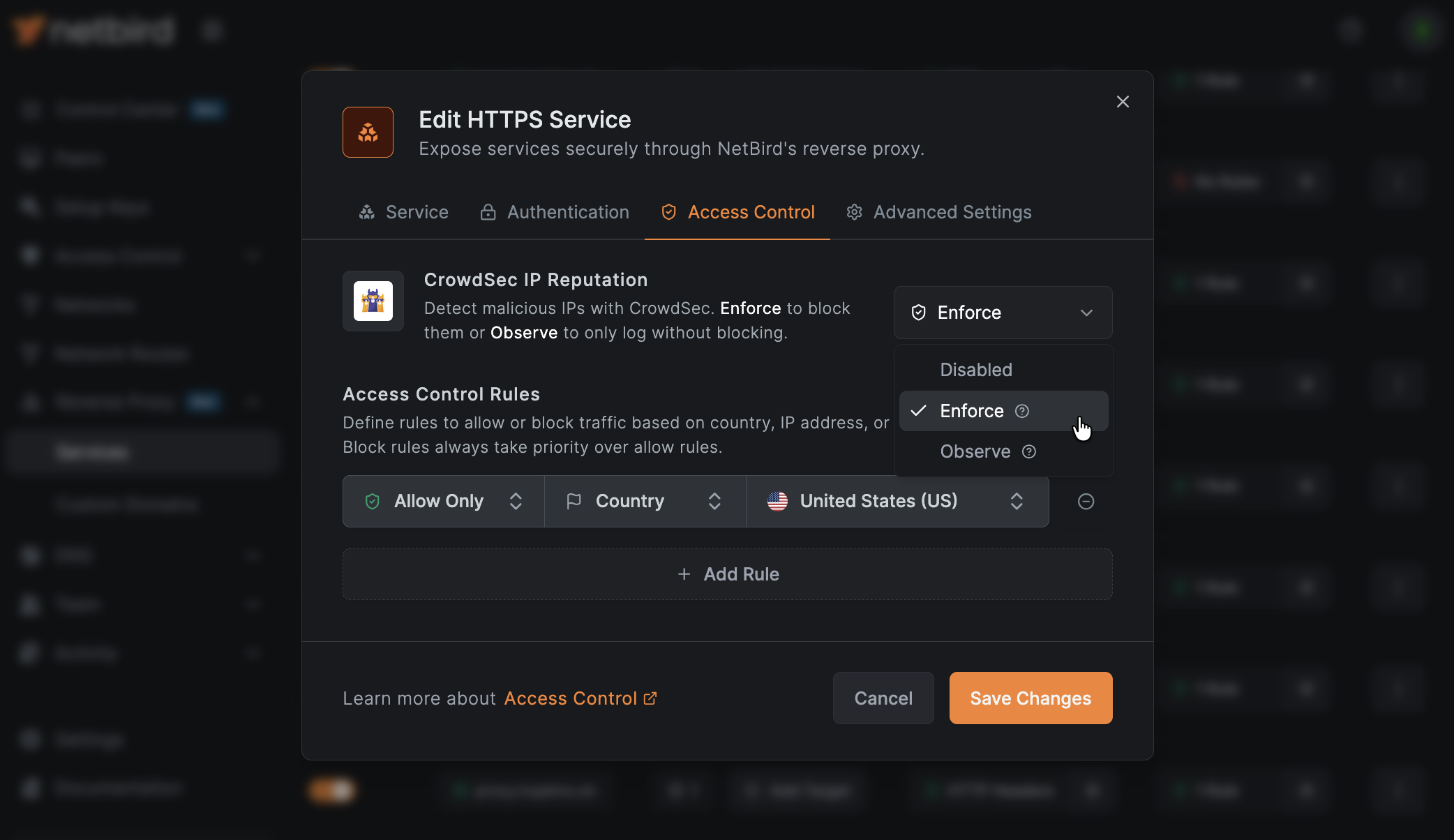
CrowdSec is an open-source security engine that combines local detection with a crowdsourced threat feed. Agents installed across the CrowdSec community share decisions about malicious IPs, and that shared intelligence is redistributed as blocklists that any CrowdSec instance can consume. NetBird Proxy integrates with CrowdSec to check every incoming client IP against a local decision cache and block connections from flagged addresses before they reach your services. For background on the wider CrowdSec platform, see the CrowdSec documentation.
This page covers how the integration works and how to operate it. For full setup instructions, see Step 7: Enable CrowdSec IP reputation in the Enable Reverse Proxy guide.
For version selection and updates to an existing deployment, see Upgrading Traefik and CrowdSec.
If you're running the quickstart script for a fresh installation, it offers to enable CrowdSec automatically when you choose the built-in Traefik option and enable the proxy.
CrowdSec IP reputation is currently available for self-hosted deployments. Support for NetBird Cloud is coming soon.
How it works
The integration has three components:
- CrowdSec LAPI container. A local CrowdSec instance (pinned to
v1.7.7in the quickstart) runs alongside your NetBird deployment, syncs community blocklists, and persists decisions to a dedicated Docker volume. - Stream bouncer. The proxy embeds a stream bouncer that pulls decisions from the LAPI into an in-memory cache. The bouncer starts automatically when the first service enables CrowdSec and stops when the last one disables it, so there is no ongoing cost when the feature is unused.
- Per-service enforcement. Each reverse proxy service can be set to
off,enforce, orobserve. The proxy consults the local cache on every incoming connection, so checks are fast and do not add a network round trip.
The proxy advertises a supports_crowdsec capability to the management plane, which is how the dashboard decides whether to show the CrowdSec option in the Access Control tab. If CrowdSec is not configured on the proxy cluster, the option is hidden.
Configuration is provided to the proxy via --crowdsec-api-url / --crowdsec-api-key command-line flags or the equivalent NB_PROXY_CROWDSEC_API_URL / NB_PROXY_CROWDSEC_API_KEY environment variables. The setup guide writes these to proxy.env automatically.
The proxy must receive the original client IP for reputation checks to work. Docker deployments behind Traefik should use the PROXY protocol configuration in the migration guide. Otherwise, every connection can appear to originate from Traefik.
Every active proxy in a multi-instance cluster must have CrowdSec configured for the cluster to advertise CrowdSec support. Configure each instance with access to a LAPI and a valid bouncer key.
Enforcement modes
| Mode | Behavior |
|---|---|
| Off | CrowdSec checks are disabled for the service (default). |
| Enforce | Connections from flagged IPs are denied. If the bouncer has not completed its initial sync, all connections are denied (fail-closed). |
| Observe | The verdict is recorded in access logs but does not block the connection. Use this to evaluate CrowdSec against real traffic before switching to enforce. |
CrowdSec decisions include several remediation types (ban, captcha, throttle). The proxy treats every type as a connection denial in enforce mode: there is no captcha challenge or rate limiting at the proxy layer. The specific decision type is recorded in the access logs as crowdsec_ban, crowdsec_captcha, or crowdsec_throttle so you can distinguish between them when reviewing traffic.
Reviewing observe-mode verdicts
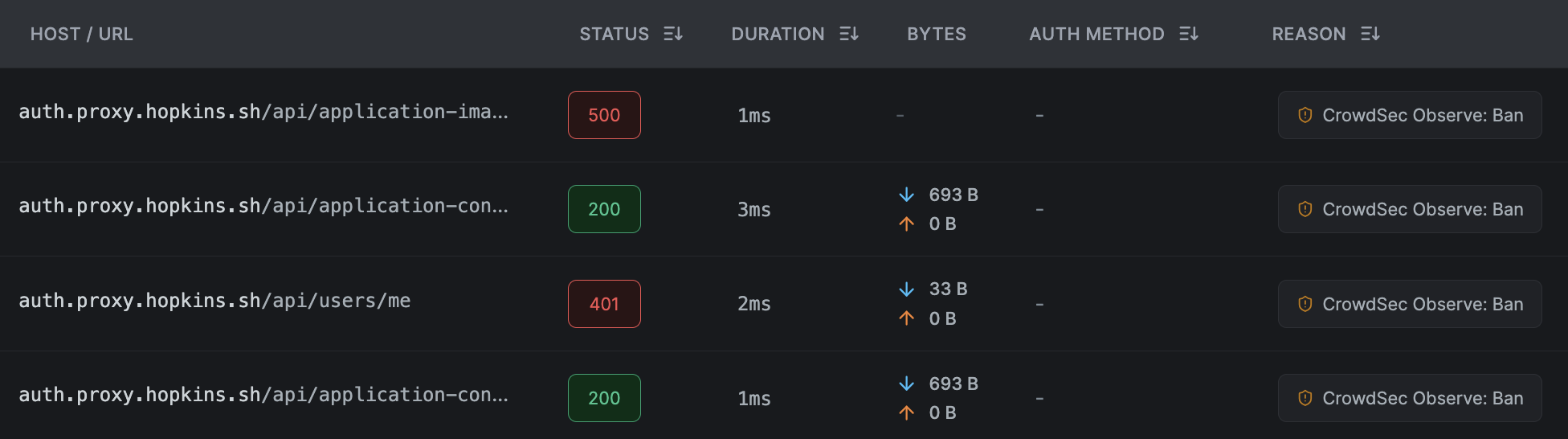
Observe-mode verdicts are recorded in the NetBird proxy access logs, not in the CrowdSec Console. When a service is in observe mode and CrowdSec flags an IP, the connection is allowed and the verdict is attached to the log entry as metadata (crowdsec_mode and crowdsec_verdict), with no deny reason contributed by CrowdSec. In the dashboard's reverse proxy event log, these entries render with an observe-mode badge on the reason cell and show the decision type (ban, captcha, throttle, unavailable) so you can audit what would have been blocked before switching the service to enforce. The CrowdSec Console shows the aggregate view of community decisions and scenarios but does not know which of your proxy requests the bouncer was consulted on.
Access restrictions are evaluated in a fixed order: CIDR, then country, then CrowdSec. A denial at any earlier layer short-circuits the rest, and CrowdSec can never relax a CIDR or country decision. See the restriction evaluation order reference for the full precedence table and worked examples.
Enroll with the CrowdSec Console (optional)
Enrolling your LAPI with the CrowdSec Console lets you view blocked IPs, manage scenarios, and opt into premium blocklists from a web UI. Enrollment is always a manual step: the quickstart script prints the command to run once setup finishes, but does not perform the enrollment for you. To enroll any deployment:
docker compose exec crowdsec cscli console enroll <your-enrollment-key>
docker compose restart crowdsec
Enrollment is optional. The bouncer continues to sync the community blocklist without it.
Configuring services
Once CrowdSec is enabled on the proxy, the CrowdSec IP Reputation dropdown appears in the Access Control tab of each reverse proxy service. Set it to Enforce or Observe per service. See reverse proxy authentication for configuration steps and access logs for the verdict fields that appear in event logs.
Testing the integration
After enabling CrowdSec on at least one service, confirm that the proxy bouncer connected to the LAPI and completed its initial decision sync:
docker compose logs proxy | grep -i crowdsec
A healthy bouncer looks like this:
netbird-proxy  | INFO proxy/internal/crowdsec/bouncer.go:70: connecting to CrowdSec LAPI at http://crowdsec:8080
netbird-proxy  | INFO proxy/internal/crowdsec/registry.go:94: CrowdSec bouncer started
netbird-proxy  | INFO proxy/internal/crowdsec/bouncer.go:187: CrowdSec bouncer synced initial decisions
These lines only appear once a service has CrowdSec set to enforce or observe. The bouncer starts lazily, so configuring NB_PROXY_CROWDSEC_API_URL and restarting the proxy produces no CrowdSec log output on its own. Empty output before the first service is enabled is expected and is not a failure.
What the engine holds
A newly registered CrowdSec instance receives an empty community blocklist and fetches the full list on its next scheduled pull, up to two hours later:
capi/community-blocklist : received 0 new entries (expected if you just installed crowdsec)
Start pull from CrowdSec Central API (interval: 1h59m7s once, then 2h0m0s)
Until that completes, a service in enforce mode has nothing to enforce. Use the manual decision test below to verify enforcement immediately.
Once the blocklist has synced, note that cscli decisions list hides CAPI-sourced decisions by default, so it can show a handful of entries while the engine holds thousands. To inspect them, request the CAPI origin explicitly:
docker compose exec crowdsec cscli decisions list --origin CAPI | head -20
--limit bounds the number of alerts returned, not decisions. The community blocklist arrives as a single alert containing every address, so --limit does not meaningfully shorten this output; pipe it through head instead.
To size the blocklist, read the cs_active_decisions gauge. It is reported per origin/reason/action combination rather than as a single total, so sum the series you care about:
docker compose exec crowdsec sh -c "wget -qO- http://127.0.0.1:6060/metrics" | grep '^cs_active_decisions'
cs_active_decisions{action="ban",origin="CAPI",reason="generic:scan"} 6547
cs_active_decisions{action="ban",origin="CAPI",reason="ssh:bruteforce"} 8452
cs_active_decisions{action="ban",origin="crowdsec",reason="crowdsecurity/ssh-slow-bf"} 1
The crowdsecurity/linux collection installed by default provides syslog and SSH parsers. It only produces decisions if CrowdSec can read those logs, which requires mounting them into the container (for example /var/log:/var/log:ro plus an acquisition file in crowdsec/acquis.d/). Without a log source, the collection is inert and the community blocklist is the only source of decisions.
To verify end-to-end enforcement without waiting for a real malicious IP to hit the cache, add a short-lived decision for your own IP and then attempt a connection:
docker compose exec crowdsec cscli decisions add --ip <your-public-ip> --duration 5m --reason "netbird test"
With a service set to enforce, the connection from <your-ip> is rejected with a 403 within roughly 10 seconds (the bouncer poll interval), and the access log entry carries crowdsec_ban in its auth_method_used and metadata.crowdsec_verdict fields. With a service set to observe, the connection succeeds and the verdict appears on the event entry with an observe-mode badge. The decision expires automatically after 5 minutes, or you can remove it earlier with cscli decisions delete --ip <your-ip>.
If the dashboard is also protected by CrowdSec AppSec, banning the address you are browsing from blocks the NetBird dashboard and the /api path as well, and the block cannot be lifted from the UI. Run this test from an address you are not administering from, or be prepared to remove the decision over SSH.
cscli decisions add also accepts --type captcha and --type throttle. NetBird Proxy denies all three types identically with a 403; only the recorded verdict string differs.
Allowlisting addresses
To exempt an address or range from all decisions, including the community blocklist, use CrowdSec allowlists (available from CrowdSec 1.6.8):
docker compose exec crowdsec cscli allowlists create netbird-admins -d "Addresses that should never be blocked"
docker compose exec crowdsec cscli allowlists add netbird-admins <your-ip> -d "admin"
docker compose exec crowdsec cscli allowlists check <your-ip>
The -d description flag is required on create. Changes apply immediately with no restart.
Allowlisting applies to existing decisions as well as future ones. Adding an address that is already blocked expires the matching decisions immediately:
1 decisions deleted by allowlists
CrowdSec also refuses to create new decisions against an allowlisted address, which affects the manual test above:
Error: cscli decisions add: <ip> is allowlisted by item <ip> from netbird-admins (admin),
use --bypass-allowlist to add the decision anyway
The older capi_whitelists_path setting in config.yaml is deprecated upstream in favour of allowlists.
Recovering from an unwanted block
If a legitimate address is blocked, remove the decision and, if it should never be blocked again, add it to an allowlist:
docker compose exec crowdsec cscli decisions list
docker compose exec crowdsec cscli alerts list
docker compose exec crowdsec cscli decisions delete --ip <the-ip>
cscli alerts list includes a kind column that identifies which component generated the alert: crowdsec for local log detection, waf for an AppSec match, and cscli for a manually added decision. An individual AppSec match blocks only that request and does not appear in cscli decisions list; use cscli metrics show appsec to inspect those instead. If you installed the crowdsecurity/appsec-virtual-patching collection for dashboard protection, matches against two different AppSec rules from the same IP within about a minute trigger the crowdsecurity/appsec-vpatch scenario, which creates a regular 4-hour IP ban that does appear in cscli decisions list. Loopback and private IPv4 addresses are exempt from this ban through the default crowdsecurity/whitelists parser, although their individual matching requests are still blocked.
For dashboard lockouts specifically, see Recovering from a dashboard lockout.