

Disable Local Authentication
Updated
If you prefer to delegate all credential storage and authentication to your IdP while still utilizing NetBird's new, simplified IdP connection flow, you can completely disable local (email/password) authentication.
This is useful when you want to:
- Enforce that all users authenticate via external identity providers only
- Simplify end user login by directing users to your external IdP when logging in to NetBird
- Prevent local password-based logins while still using NetBird's simplified IdP connection flow
- Maintain a single source of truth for user credentials in your external IdP
Disabling local authentication preserves existing local user accounts in the database. If you re-enable local authentication later, those users will be able to log in again with their existing credentials.
Prerequisites
Before disabling local authentication:
- Configure an external IdP connector following the Authentication Guide.
- Log out and log in with your new admin account via the external IdP. NetBird will notify you that the user requires approval.
- Log back in as your original NetBird-local admin and navigate to Team > Users. You should see the new IdP user pending approval:

- Approve the request, click on the user, select Owner as the role, confirm the ownership transfer, and save.
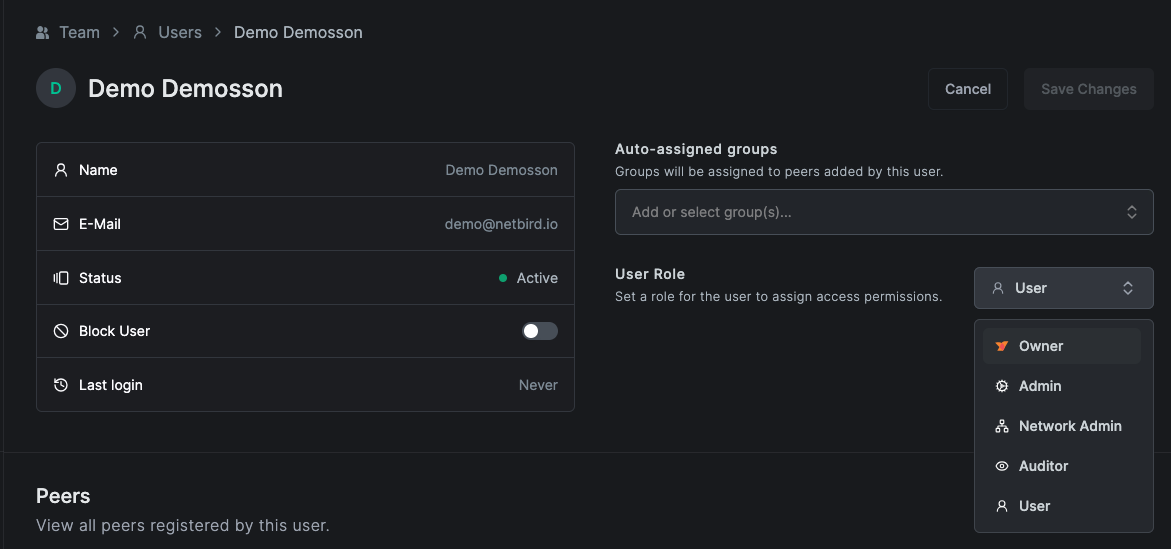
- Verify you can log in via the external IdP with full owner access.
Complete all prerequisite steps before disabling local authentication. If you disable local login without first promoting an external IdP user to Owner, you will lose administrative access to your instance.
NetBird will refuse to disable local authentication if no external identity provider connectors are configured. This prevents you from being locked out of your instance.
Configuration
Combined setup (config.yaml)
If you deployed using the getting-started.sh quickstart script (post v0.65.0) or have
already migrated to the combined container, your deployment uses
config.yaml.
Set localAuthDisabled to true under the server.auth section of your config.yaml:
server:
  auth:
    issuer: "https://netbird.example.com/oauth2"
    localAuthDisabled: true
    signKeyRefreshEnabled: true
    dashboardRedirectURIs:
      - "https://netbird.example.com/nb-auth"
      - "https://netbird.example.com/nb-silent-auth"
    cliRedirectURIs:
      - "http://localhost:53000/"
Restart the server to apply the change:
docker compose restart netbird-server
Older multi-container setup (management.json)
This section applies to deployments using the older multi-container architecture with separate dashboard, management,
signal, relay, and coturn containers. If you deployed using getting-started.sh post-v0.65.0,
you are on the combined setup and should use the config.yaml instructions above. See the
migration guide to upgrade.
Update your management.json:
{
  "EmbeddedIdP": {
    "Enabled": true,
    "LocalAuthDisabled": true
  }
}
Restart the Management service:
docker compose restart management
After updating the configuration, the local login option will no longer appear on the login page — users will only see the configured external identity providers.
Re-enabling Local Authentication
To restore local authentication, reverse the configuration change and restart the server:
- Combined setup: set
localAuthDisabledback tofalseinconfig.yamland rundocker compose restart netbird-server. - Older multi-container setup: set
LocalAuthDisabledtofalseinmanagement.jsonand rundocker compose restart management.
All previously created local users will be able to log in again with their existing passwords.