

Bypass Compliance for Non-Compliant Peers
Updated
In some situations, you may need to grant network access to a peer that fails EDR or MDM compliance checks. NetBird provides a compliance bypass mechanism that allows administrators to override compliance rejections on a per-peer basis.
When to Use Compliance Bypass
Compliance bypass is useful in scenarios such as:
- Temporary exceptions: A device needs immediate network access while compliance issues are being resolved.
- Testing and development: Test devices that may not have EDR agents installed.
- Legacy devices: Older devices that cannot run the required EDR agent but still need limited network access.
- False positives: When the EDR platform incorrectly flags a compliant device.
Compliance bypass should be used sparingly and only when necessary. It bypasses security controls designed to protect your network.
How Compliance Bypass Works
When you bypass compliance for a peer:
- The peer immediately gains network access, regardless of its compliance status.
- The bypass remains active until:
- An administrator manually revokes it, OR
- The device becomes naturally compliant in the EDR system (bypass is automatically removed)
- All bypass actions are logged in the Activity Events for audit purposes.
Bypass Compliance for a Peer
To bypass compliance for a non-compliant peer:
- Navigate to the Peers page in the NetBird dashboard
- Locate the peer showing
Non-compliantstatus (red badge) - Hover over the Bypass button to see which integration's compliance check will be bypassed
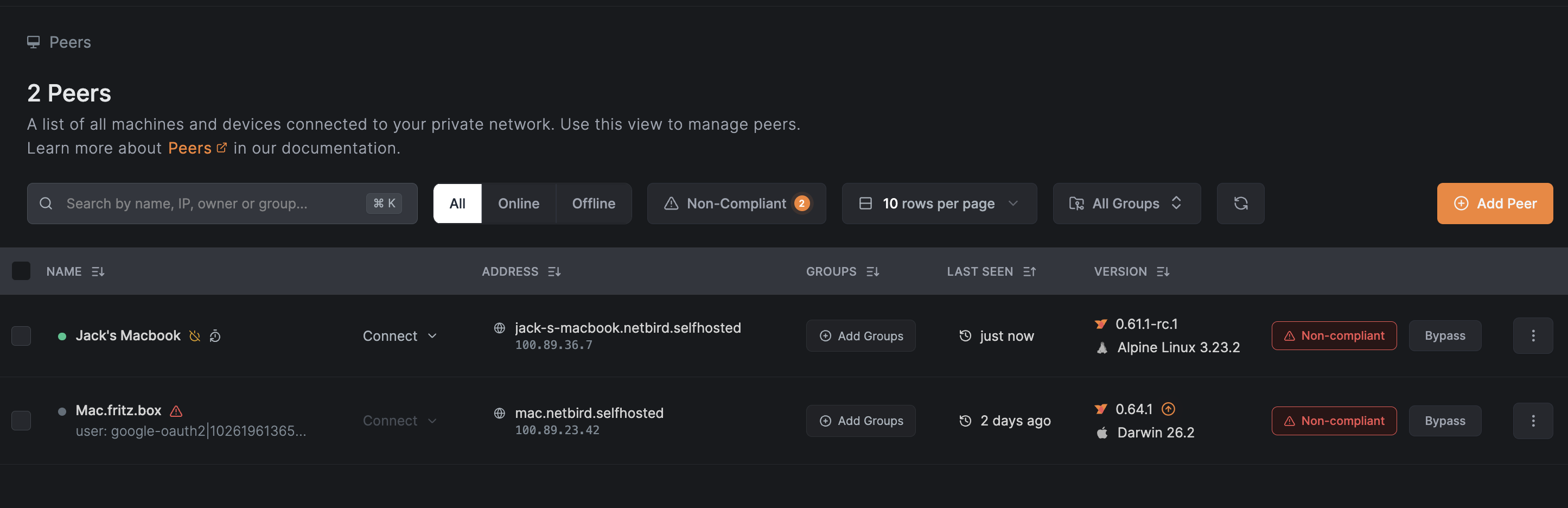
- Click the Bypass button and confirm the action in the dialog
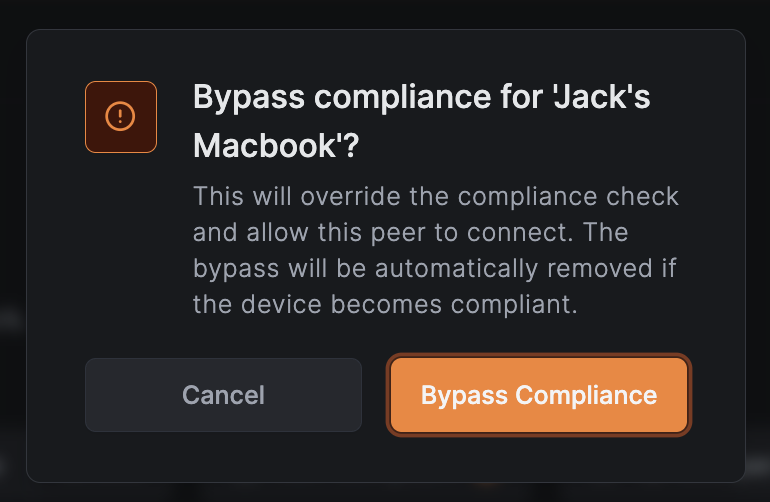
The peer will immediately gain network access and the non-compliant status will be replaced with a green Bypassed badge.
View Bypassed Peers
To see all peers that have compliance bypassed:
- Navigate to the Peers page
- Click the Bypassed filter button (shows a count badge with the number of bypassed peers)
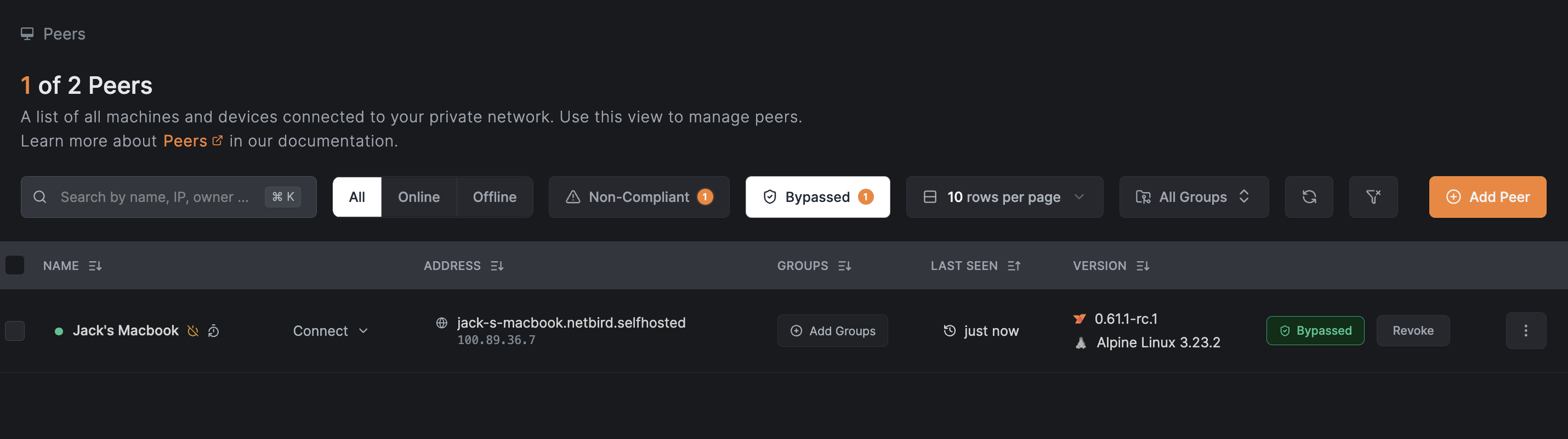
The filter can be combined with connection status filters:
- Click Online + Bypassed to see only online bypassed peers
- Click Offline + Bypassed to see only offline bypassed peers
Hovering over the filter buttons shows helpful tooltips:
- Non-Compliant: "Peers that failed compliance checks and need attention"
- Bypassed: "Peers with compliance checks bypassed by an administrator"
Revoke Compliance Bypass
To revoke a bypass and return a peer to normal compliance validation:
- Navigate to the Peers page
- Click on the peer with bypassed compliance
- Click the Revoke button next to the "Bypassed" badge
- Confirm the action
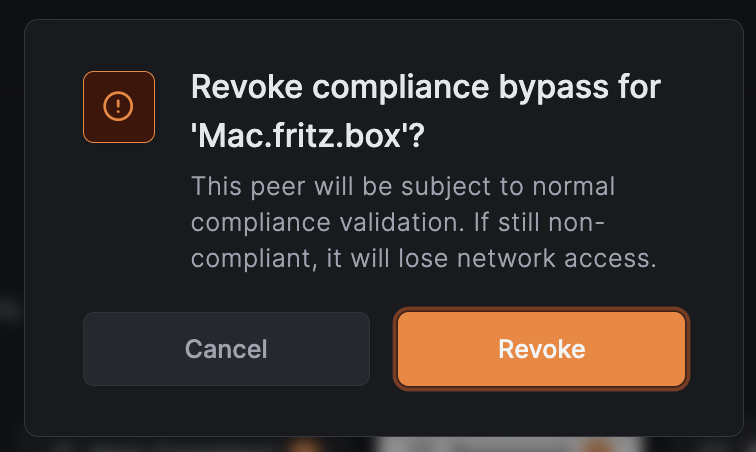
Once revoked, the peer will be subject to normal compliance checks. If the device is still non-compliant, it will lose network access and show the Non-compliant status again.
Batch Operations
You can bypass compliance or revoke bypass for multiple peers at once:
Batch Bypass
- Navigate to the Peers page
- Select multiple peers using the checkboxes (peers must have non-compliant status)
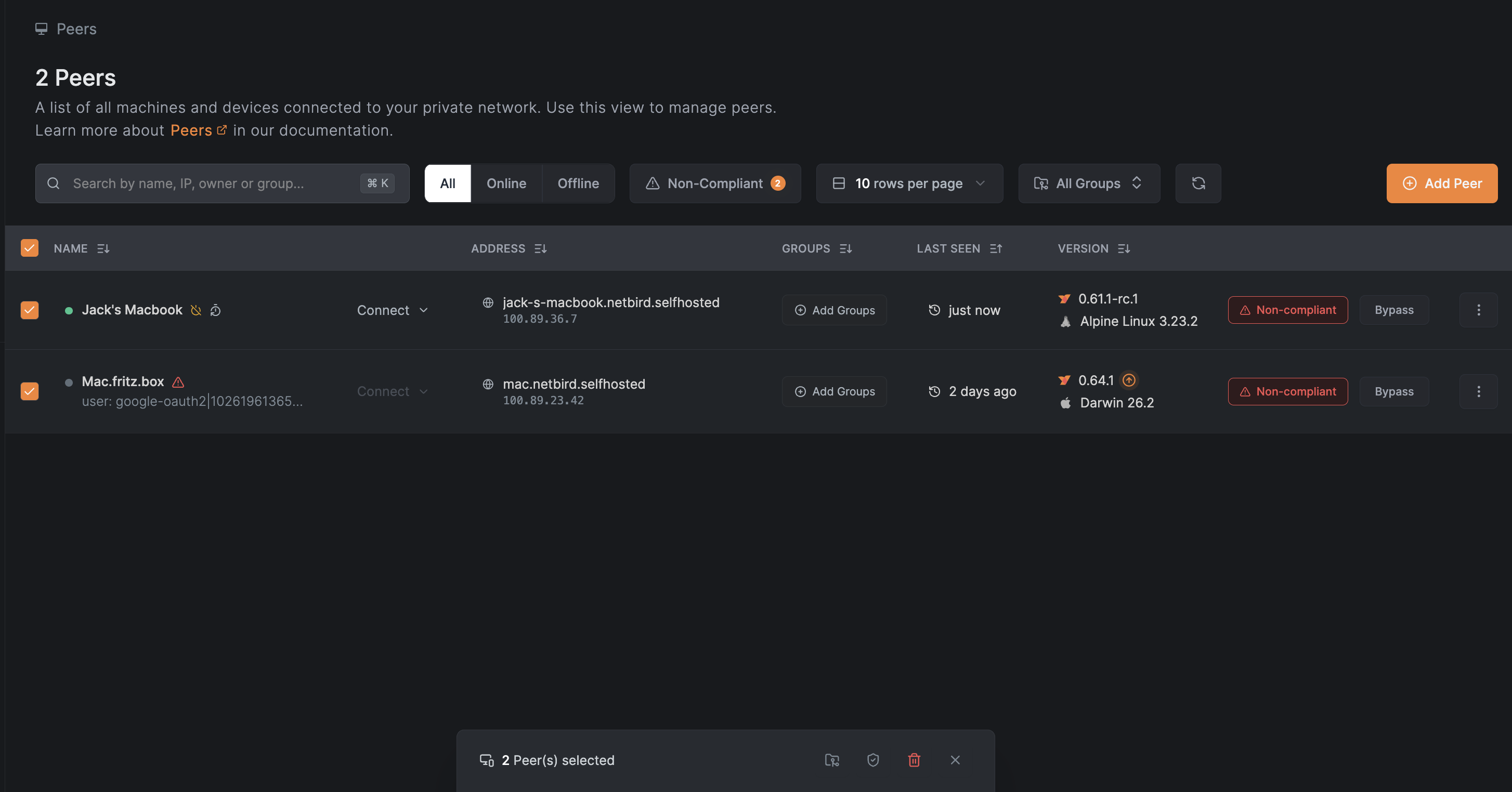
- In the action bar that appears at the bottom, click the Bypass Compliance button (shield icon)
- Confirm the action in the dialog
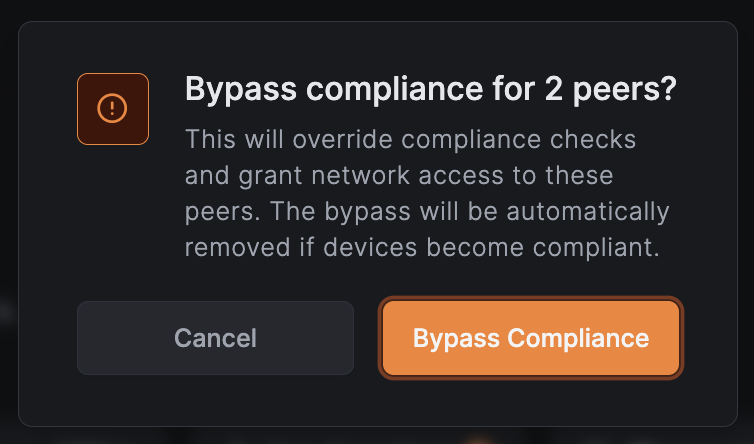
The button shows a count of how many selected peers will have compliance bypassed.
Batch Revoke Bypass
- Navigate to the Peers page
- Select multiple bypassed peers using the checkboxes
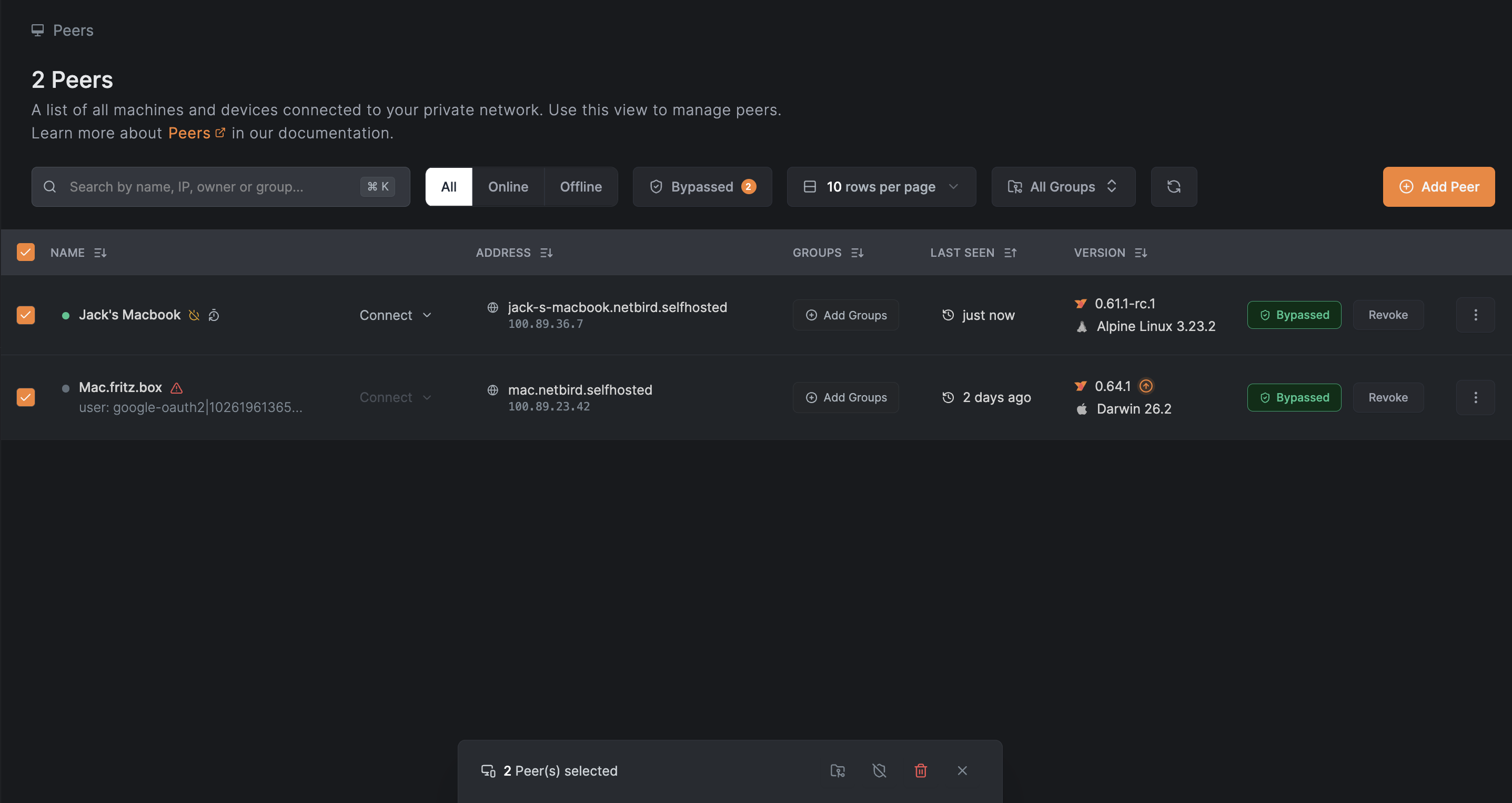
- In the action bar that appears at the bottom, click the Revoke Compliance Bypass button (shield-off icon)
- Confirm the action in the dialog
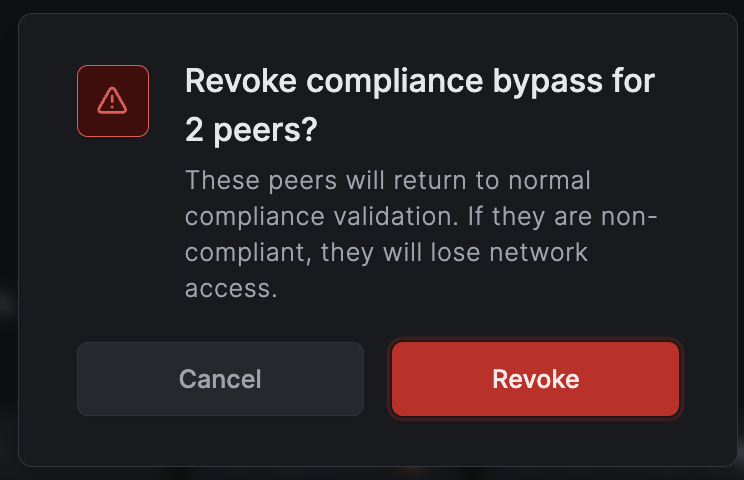
Batch operation buttons only appear when you have an EDR integration enabled and have selected peers that can have compliance bypassed or revoked.
Automatic Removal of Bypass
Compliance bypass is automatically removed when a device becomes naturally compliant in your EDR platform. This ensures that:
- Devices don't retain unnecessary administrative overrides
- Your security posture improves as devices become compliant
- You don't need to manually clean up bypasses
For example, if you bypass compliance for a peer because its EDR agent was temporarily offline, the bypass will be automatically removed once the agent reconnects and the device passes compliance checks.
Activity Logging
All compliance bypass actions are recorded in the activity log:
| Event | Description |
|---|---|
Peer compliance bypassed by admin | An administrator bypassed compliance for a peer |
Peer compliance bypass revoked | An administrator or the system removed the bypass |
You can view these events in the Activity Events page, including details about which administrator performed the action and the original rejection reason.
API Access
Compliance bypass can also be managed via the NetBird API:
# Bypass compliance for a peer
curl -X POST "https://api.netbird.io/api/peers/{peer-id}/edr/bypass" \
  -H "Authorization: Token <your-api-token>"

# Revoke compliance bypass
curl -X DELETE "https://api.netbird.io/api/peers/{peer-id}/edr/bypass" \
  -H "Authorization: Token <your-api-token>"

# List all bypassed peers
curl -X GET "https://api.netbird.io/api/peers/edr/bypassed" \
  -H "Authorization: Token <your-api-token>"
Best Practices
- Document exceptions: Keep a record of why each compliance bypass was granted.
- Review regularly: Periodically review bypassed peers and revoke bypasses that are no longer needed.
- Use time-limited access: Consider revoking bypasses after a defined period.
- Monitor activity: Watch for unusual patterns in bypass usage.
- Prefer compliance: Always aim to bring devices into compliance rather than relying on bypasses.
Compliance bypass requires the EDR Update permission. Only users with appropriate roles can bypass compliance or revoke bypasses.