

How Agent Network Works
Updated
Agent Network gives every agent a real identity and governs what it can reach over NetBird's encrypted overlay. It works along two paths, depending on what the agent is calling:
- LLM APIs and AI gateways are reached through a single agent network endpoint served by the NetBird proxy. It sits between your agents and the APIs they call. You point your agent at that endpoint instead of the provider's URL, and the proxy ties each request to an identity, evaluates it against your policies, enforcing token and budget limits, quotas, and model guardrails. It also injects the upstream provider key server-side, forwards the request, and records usage and cost for every call.
- Internal resources such as databases, internal APIs, and self-hosted models, are reached directly over peer-to-peer WireGuard tunnels, the same way any NetBird peer reaches another. This traffic is governed by the same identities and access policies but does not pass through the proxy, so there is no endpoint or key injection. The agent connects straight to the resource over the overlay.
Architecture
Agent Network is built on two existing NetBird capabilities: the overlay network (an encrypted WireGuard mesh between peers) and the reverse proxy (a peer that terminates requests and forwards them to upstreams). Around those, the management service adds an identity-aware control plane for AI traffic.
LLM APIs and AI Gateways
The diagram below illustrates the first path, an LLM request: the agent reaches the
endpoint over the WireGuard overlay, the proxy enforces identity, policies, limits, and guardrails
against the management control plane, injects the provider key, and forwards to the
upstream API or gateway. The proxy can also inject the calling agent's identity into the
request, so the gateway itself can attribute usage and enforce its own limits based on the
agent's group membership. For example, with a LiteLLM gateway it writes the agent's IdP groups
into metadata.tags and its identity into the x-litellm-end-user-id header, so LiteLLM
can apply tag budgets and per-user attribution. With agentgateway, NetBird uses the trusted
x-netbird-user-id and x-netbird-groups headers for request attribution.
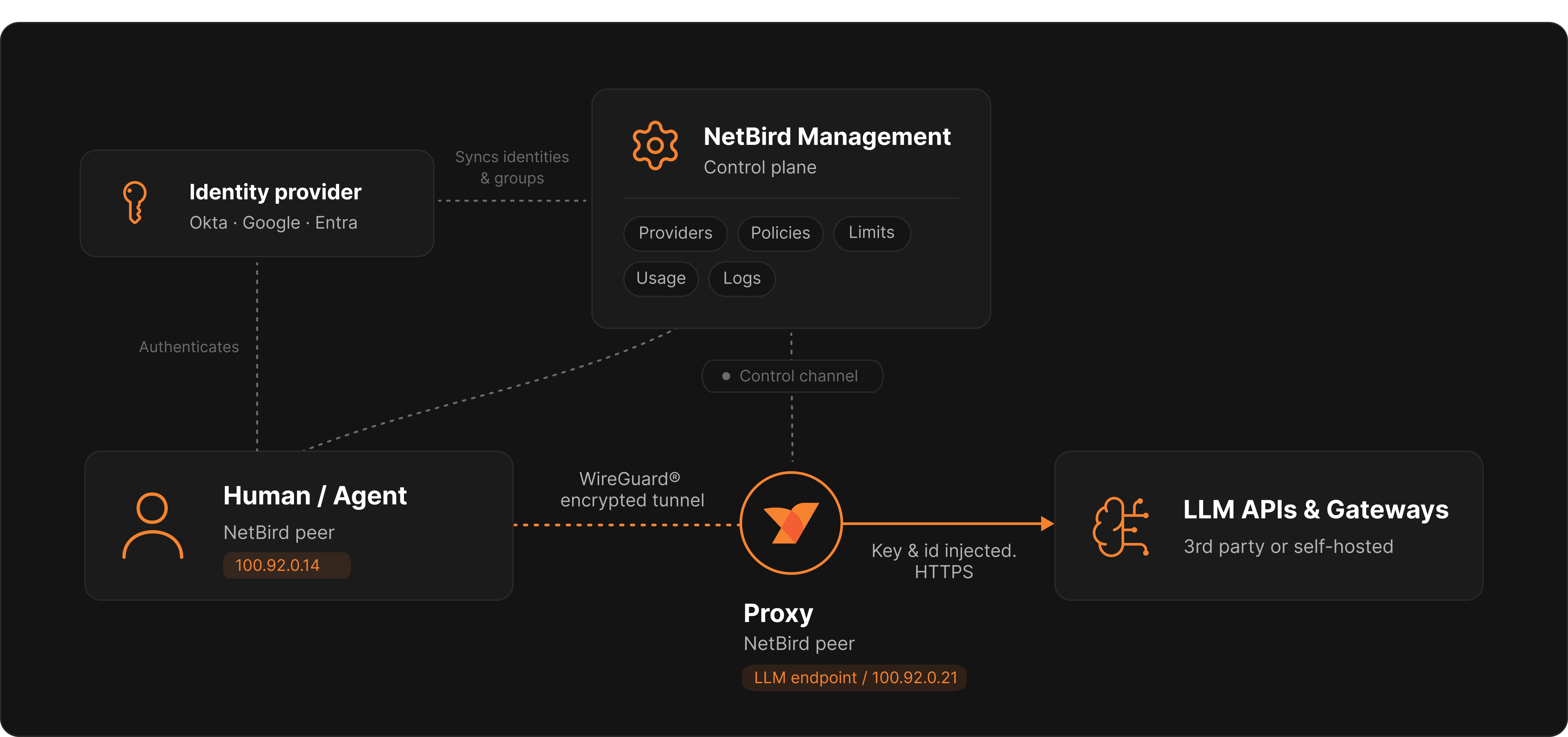
- NetBird client: the agent's device joins the overlay as a peer. Its requests to the endpoint are routed through the WireGuard tunnel, not the public internet.
- Proxy peer: handles LLM traffic only. It terminates the request, establishes the caller's identity, runs the routing and policy pipeline, injects the provider key, and forwards to the upstream API or gateway.
- Management service: the control plane. It holds providers, policies, guardrails, and limits; resolves identities against your IdP; answers the proxy's per-request policy checks; and records usage and access logs.
- Identity provider: your existing IdP (Okta, Microsoft Entra ID, Google, …) supplies the identities and group memberships that policies are written against.
- Upstreams: for LLM traffic, the proxy forwards to LLM APIs and AI gateways.
The endpoint hostname itself (for example https://sailcloth.netbird.ai) is generated
when you connect your first provider and is only reachable from inside your overlay.
It applies to LLM traffic only; internal resources keep their normal peer addresses on the
overlay.
Internal Resources
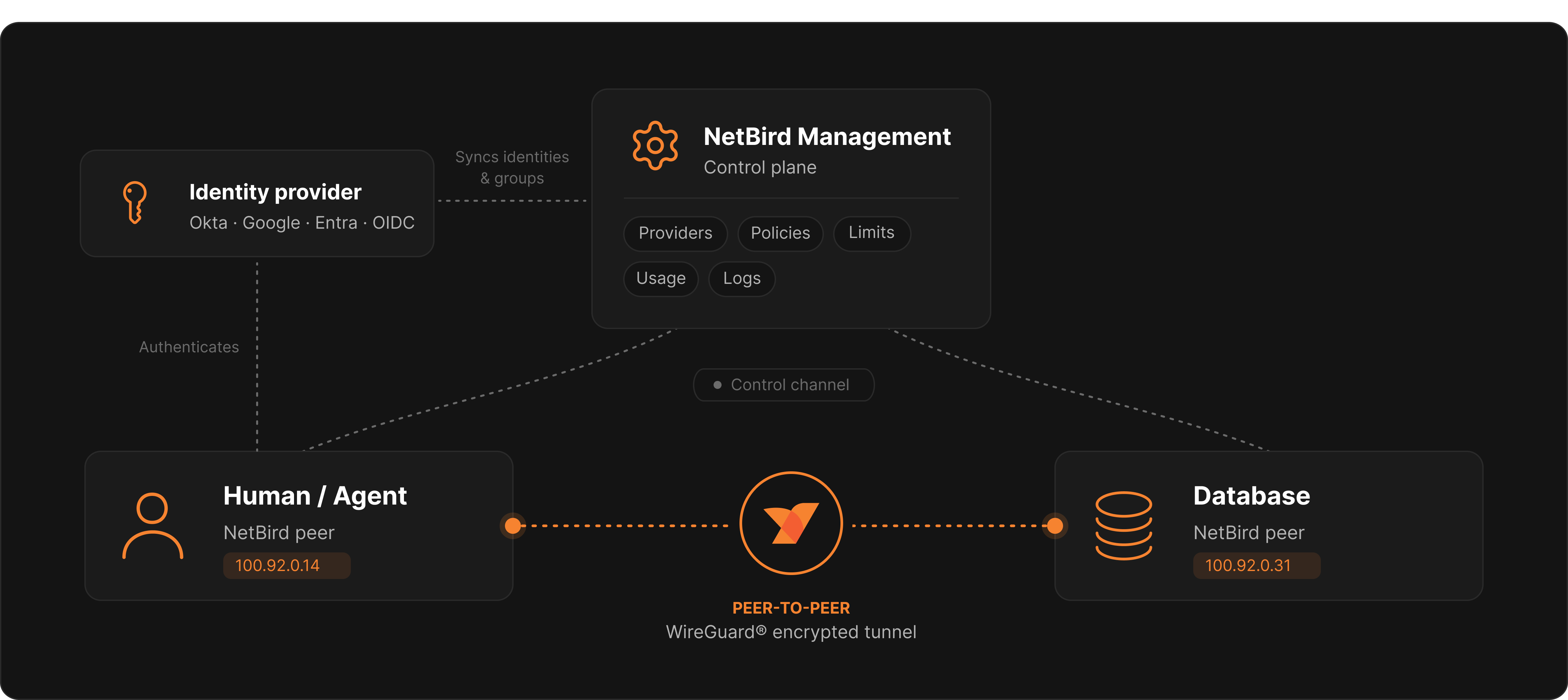
The second path covers everything that isn't an LLM API: internal databases, internal APIs, and self-hosted models on a GPU host. Here the proxy is not involved at all. The agent connects to the target's overlay address directly over a peer-to-peer WireGuard tunnel, exactly the way any NetBird peer reaches another. Access is still identity-based: the agent's peer identity and group membership are matched against your access policies, so it can reach only the resources it is authorized for. Because the traffic never passes through the proxy, this path has no agent network endpoint, no provider-key injection, and no token, budget, or per-request LLM logging. It is governed like standard NetBird peer-to-peer access. This keeps internal traffic fast and private, flowing straight between the two peers. Because NetBird is a peer-to-peer network, this also works in reverse, so a resource can reach back to an agent when needed, such as to deliver a callback or webhook.
The Lifecycle of an LLM Request
This pipeline applies to LLM traffic: requests to the agent network endpoint. Access to internal resources skips it entirely and flows peer-to-peer (see Internal Resources).
The proxy runs each request through an ordered chain of middleware. On the way to the upstream:
- Establish identity. The request arrives over the WireGuard tunnel, so the proxy maps it to the calling NetBird peer and its identity, tied to your IdP for a human user, or the peer's own NetBird identity for an autonomous agent, together with its group membership. See Identity and Authentication.
- Parse the request. Read the target model and stream flag from the body, and capture the prompt if prompt collection is enabled.
- Route and inject the key. Match the model to a provider the caller's groups are authorized to use, rewrite the upstream target, strip any client-supplied auth headers, and inject the provider's key from server-side storage. See Routing and Keyless Access.
- Check policy and limits. Ask management to select the matching policy and evaluate account- and policy-level token and budget caps. If unauthorized or a cap is exhausted, the request is denied here. See Policies, Limits, and Guardrails.
- Stamp identity for the gateway. Add the caller's identity to the upstream request
(for example into
metadata.tagsandx-litellm-end-user-id, or agentgateway'sx-netbird-user-idandx-netbird-groupsheaders) for gateways that key their own budgets and attribution off it, or into a provider's own cost-allocation metadata such as AWS Bedrock'sX-Amzn-Bedrock-Request-Metadata. This is on by default and can be turned off per provider. See Identity Metadata. - Apply guardrails. Enforce the model allowlist and the prompt-capture rules.
The request is then forwarded to the upstream API or gateway. On the response leg, in reverse:
- Meter. Extract token counts from the response and convert them to cost.
- Record. Post the usage back to management to update the limit counters. Usage is always recorded; a full access-log entry is written when log collection is on. See Usage and Access Logs.
A denial at any gate returns 403 to the client with a machine-readable reason, and the
request is still recorded so it appears in your logs.
Identity and Authentication
Every request is tied to a real identity before any policy runs, and that identity always comes from the NetBird tunnel. Because the request arrives over WireGuard, the proxy maps its source to the enrolled peer and resolves the peer's NetBird identity and group membership:
- For a human user: for example someone running Claude Code, the NetBird identity is tied to your identity provider (Okta, Microsoft Entra ID, Google, …), so the request carries that user and the groups they belong to.
- For an autonomous agent, the identity is the agent's own NetBird peer identity and the groups assigned to that peer.
Either way the request carries a real identity and its group membership, captured at request time. There is no API key or separate login on the client. The tunnel is the credential. Policies are written against those groups, so access to AI follows the same identities your organization already manages.
Routing: Matching a Request to a Provider
A request names a model (for example claude-opus-4-8 or gpt-4o). The router picks the
provider to serve it by:
- Model claim. Keeping providers whose allowed-models list includes the requested model. A provider with no model list acts as a catch-all gateway.
- Group authorization. Keeping only providers the caller's groups are allowed to reach. This authorization is compiled from your policies, so a provider is reachable only where a policy grants it.
- Specificity. Preferring a same-vendor, explicitly-claimed model over a catch-all gateway.
If no provider claims the model, the request is denied as model not available. If a provider claims it but the caller's groups aren't authorized, it's denied as no authorized provider. When a route is found, the proxy records which configured provider was selected and which groups authorized it.
Policies, Limits, and Guardrails
Routing decides where a request can go; policies decide whether it may and under what budget. By default nothing is allowed: a policy must connect a source group to one or more providers.
At request time, management evaluates, in order:
- Account ceilings. Account-wide budget rules are checked first. If an account-level token or budget cap is exhausted, the request is denied regardless of policy.
- Applicable policies. Among enabled policies whose providers include the selected provider and whose source groups intersect the caller's groups, management picks one to attribute the request to. Uncapped policies and larger remaining budgets are preferred, with deterministic tie-breaking, so requests drain the most appropriate bucket first.
- Limits. A policy may cap tokens or spend per user and/or per group over a rolling time window. Usage is accumulated in windowed counters aligned to a fixed epoch, so the same totals hold across a clustered deployment.
- Guardrails. A policy can attach guardrails such as a model allowlist (reject models outside the list) and prompt capture controls.
Each denial carries a reason that surfaces in the access log:
| Reason | Meaning |
|---|---|
| Model not available | No provider is configured to serve the requested model |
| No authorized provider | A provider serves the model, but the caller's groups aren't allowed |
| Model not allowed | A guardrail's model allowlist rejected the model |
| Token limit exceeded | A policy or account token cap is exhausted for the window |
| Budget limit exceeded | A policy or account spend cap is exhausted for the window |
See Policies and Global Limits for how to configure these.
Keyless Access
Provider API keys live only on the server. When you connect a provider, its key is stored
encrypted by the management service. During a request the proxy strips any
client-supplied authorization headers (Authorization, x-api-key, and similar) and
injects the provider's key on the way to the upstream.
The practical effect: agents authenticate to NetBird with their NetBird identity, never with a provider key. Keys can't leak from a client because clients never hold them, and rotating a provider key is a single server-side change.
Usage and Access Logs
Agent Network separates lightweight accounting from full audit detail:
- Usage is recorded for every served request: identity, provider, model, tokens, and cost, regardless of any logging setting. This always-on stream powers the usage dashboards and the limit counters, and is retained indefinitely.
- Access logs add the full per-request detail (method, path, status, duration, and, when prompt capture is on, the prompt and completion). Full access-log entries are written only when log collection is enabled for the account, and are swept after a configurable retention period. Prompts can be redacted for PII.
See Usage & Logs for the dashboards and controls.
The Overlay Network
The transport underneath all of this is NetBird's WireGuard overlay. The agent's device is a peer, the proxy is a peer, and connections are established directly between peers. Because WireGuard is UDP-based and peer-to-peer, the overlay traverses NAT and firewalls without opening inbound ports, changing security groups, or altering network topology.
This is also where the two paths differ:
- LLM traffic rides the overlay to reach the proxy peer, which then applies the pipeline above and forwards to the upstream API or gateway.
- Internal resources: databases, APIs, and self-hosted models, are reached over a direct peer-to-peer tunnel between the agent and the target peer, with no proxy in between. Access is governed by the same identities and access policies as any other NetBird peer, so an agent reaches only the resources its identity is allowed to.
Next steps
- Quickstart. Deploy Agent Network and make your first keyless call.
- Providers. Connect LLM APIs, gateways, and local models.
- Policies. Authorize identities and attach limits and guardrails.
- Usage & Logs. Track cost, usage, and per-request audit.