

Upgrade Your Self-Hosted NetBird Installation
Updated
This guide covers NetBird upgrades and updating Traefik and CrowdSec, including deployments created from marketplace images. Run the commands from the directory containing your docker-compose.yml (/opt/netbird on Vultr).
Check for Updates
The NetBird Dashboard displays an update indicator at the bottom of the left navigation menu when a new version is available:
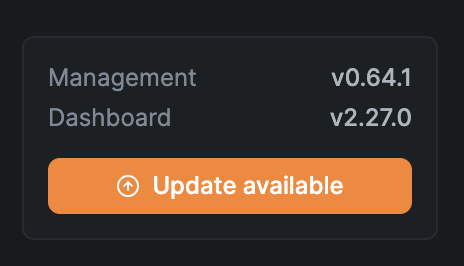
You can also check the current version programmatically via the API (requires authentication):
curl 'https://your-netbird-domain/api/instance/version' \
  -H 'accept: application/json' \
  -H 'authorization: Bearer <your-access-token>'
Example response:
{
    "dashboard_available_version": "2.28.0",
    "management_available_version": "0.64.1",
    "management_current_version": "0.64.0",
    "management_update_available": true
}
The dashboard indicator and version API cover NetBird components. They do not report updates for Traefik, CrowdSec, or the optional Traefik CrowdSec bouncer plugin. Check those projects' releases separately, as described below.
Check Release Notes
Before upgrading, review the release notes for any breaking changes or migration steps:
- Dashboard: https://github.com/netbirdio/dashboard/releases
- Management, Signal, and Relay: https://github.com/netbirdio/netbird/releases
Management, Signal, and Relay are all part of the same repository and share the same version numbers.
Upgrade Steps
To upgrade NetBird to the latest version:
- Run the backup steps described in the backup section.
- Review the release notes (see above) for any breaking changes.
- Check the
image:entries indocker-compose.yml. If you use explicit version tags, change them to the releases you want to deploy before pulling.docker compose pulldownloads the configured tags; it does not change them. With:latest, it fetches the image currently published under that tag. - Pull the configured NetBird images:
If you have the Reverse Proxy enabled, also pull the proxy image:
docker compose pull netbird-server dashboarddocker compose pull proxy - Restart the NetBird containers with the new images:
If you pulled the proxy image above, include it in the restart:
docker compose up -d --force-recreate netbird-server dashboarddocker compose up -d --force-recreate netbird-server dashboard proxy
Keep the Management and proxy versions in sync. Starting with v0.76.1, if the Reverse Proxy component runs a newer version than Management, Agent Network LLM cost metering is silently disabled (the proxy skips cost computation and only logs a warning). Upgrade Management before or together with the proxy.
Because the netbirdio/reverse-proxy:latest image tag does not tell you what is actually running, check the resolved proxy version with:
docker compose exec proxy /go/bin/netbird-proxy --version
Compare it with the management_current_version field returned by GET /api/instance/version before upgrading.
For upgrades from older versions (pre-v0.26.0), see the legacy upgrade notes.
Upgrading Traefik and CrowdSec
Traefik and CrowdSec have their own release cycles. Upgrading NetBird does not update their version tags or apply changes from newer installation scripts to your existing Compose file. Use your existing configuration for upgrades; rerunning getting-started.sh is not an upgrade procedure.
Choosing versions
The following dependency versions have been validated for self-hosted NetBird as of October 9, 2026:
| Component | Validated version |
|---|---|
| Bundled Traefik | traefik:v3.7.14 |
| CrowdSec | crowdsecurity/crowdsec:v1.8.1 |
| Traefik CrowdSec bouncer plugin | v1.7.1 |
Installer defaults can differ from these versions. Check the image tags in your docker-compose.yml; the bouncer plugin is configured separately in the dashboard AppSec guide. Before adopting a newer release, review its migration requirements and verify it with your NetBird configuration in a test deployment.
- Traefik: check the releases, support policy, and v3 migration notes. Configuration changes can be required within the same major version.
- CrowdSec: check the releases and Docker documentation.
- Dashboard AppSec: also check the Traefik bouncer plugin releases. The plugin version is set by
--experimental.plugins.bouncer.versionin Traefik'scommand:list. Changing the CrowdSec image does not update it.
You can subscribe to release notifications on each GitHub repository using Watch → Custom → Releases. Check security advisories and upstream support status as well as the installer defaults when planning updates.
Full version tags such as traefik:v3.7.14 and crowdsecurity/crowdsec:v1.8.1 select specific releases. A minor-version tag such as traefik:v3.6 can fetch a newer patch image without a Compose edit. For controlled rollouts, use full version tags for all images, or image digests when you need immutable references, and update them deliberately after validation.
Before changing a version
-
Record the configured images and the images currently in use:
docker compose config --images docker compose images docker compose exec traefik traefik versionIf CrowdSec is enabled, also run:
docker compose exec crowdsec cscli versionRecord the current plugin version if you use dashboard AppSec. For each image, save its digest for rollback; use an image ID from
docker compose images:docker image inspect <image-id> --format '{{json .RepoDigests}}' -
Back up the deployment, including the Compose file, environment files, Traefik dynamic configuration, CrowdSec configuration and database, and certificate volumes. If you enabled dashboard AppSec, also back up the Compose project
.envfile containing its bouncer key and thecrowdsec/acquis.d/configuration. -
Review release notes for every version you are skipping, then test the candidate versions with the checks below. Keep SSH access available independently of the dashboard and proxy while testing blocks or restarting services.
Apply the update
Change one component at a time so you can identify regressions. Edit that service's image: in docker-compose.yml to the version or digest you selected, preserving its existing environment, labels, networks, and volume mounts. If the image is supplied through a Compose variable, update that variable instead.
For Traefik, also check header handling and the Docker network setting before recreating the container.
Validate the configuration before applying it:
docker compose config --quiet
For CrowdSec, pull and recreate only its service:
docker compose pull crowdsec
docker compose up -d --no-deps crowdsec
docker compose ps crowdsec
docker compose logs --tail=100 crowdsec
Confirm CrowdSec is healthy and repeat the blocking checks below before continuing. AppSec-protected requests can be denied while CrowdSec is unavailable.
For Traefik, pull and recreate its service after editing its image:
docker compose pull traefik
docker compose up -d --no-deps traefik
docker compose logs --tail=100 traefik
If you change only the bouncer plugin version, apply the updated Traefik command: with docker compose up -d --no-deps traefik. A plain docker compose restart does not apply Compose configuration changes.
These restarts briefly interrupt the affected services. Preserve the existing CrowdSec database, bouncer keys, and certificate volumes; do not use docker compose down -v during an upgrade.
Verify the upgrade
A running container alone does not confirm that routing, certificate issuance, or blocking works. Check the features enabled in your deployment:
| Area | What to verify |
|---|---|
| Dashboard and peers | Sign in, load peers and policies, connect an existing peer, enroll a test peer, and verify peer connectivity and relay fallback. |
| Reverse proxy | Reach an existing service and create a test service. Exercise the protocols, authentication methods, and access restrictions you use, including HTTP, WebSockets, TCP/UDP/TLS services, and Traefik TLS passthrough where configured. |
| Certificates | Check trusted HTTPS on the dashboard and proxied domains without disabling certificate verification. Use a new test hostname to verify certificate issuance, and check ACME logs for failures. An existing valid certificate alone does not verify issuance or renewal; exercise renewal in the test deployment and monitor it after rollout. See Certificate troubleshooting. |
| Client IPs | Confirm proxy access logs contain the original client IP, so IP restrictions and CrowdSec decisions apply to the correct address. |
| CrowdSec IP reputation | Follow Testing the integration: confirm the bouncer syncs, a temporary decision blocks in enforce mode, observe mode allows and logs the verdict, and access returns after removing the decision. |
| Dashboard AppSec | If configured, repeat Verify protection and the middleware checks. Normal dashboard and OIDC requests should succeed; /.env and /api/.env probes should return 403, with AppSec metrics confirming inspection. Test dashboard IP blocking separately. |
| Persistence | Restart the updated services and repeat the checks. Confirm certificates, CrowdSec enrollment, bouncer authentication, and AppSec configuration survive the restart. |
Record the exact image versions or digests, plugin version, and test results with your deployment configuration so the next upgrade has a known working starting point.
Roll back a dependency update
Restore the previous image digest or full version tag and any configuration changed for that component, including the bouncer plugin version. Recreate the affected service with docker compose up -d --no-deps <service> and repeat the verification checks. Restoring a moving tag such as v3.6 or latest may fetch the upgraded image again; use the recorded digest to recover the exact previous image.
When rolling Traefik back to a release older than v3.7.12, also remove the aliasHeadersStrategy flags added in Traefik header handling. Those releases do not recognize the option and fail to start with field not found, node: aliasHeadersStrategy.
Traefik v3.0.0 through v3.7.11 are affected by header-alias spoofing (GHSA-rf44-j88r-hh8c). Removing aliasHeadersStrategy so those releases can start restores that vulnerable handling: a client can send an alias of a header Traefik wrote, and a backend that treats those names as the same variable can read the client's value instead. Do not expose an affected rollback version to untrusted traffic. Return to v3.7.12 or newer, with aliasHeadersStrategy set to delete, once service is restored.
If the release migrated stored data or configuration in a way the older version cannot read, stop the affected service and restore its pre-upgrade backup before starting the older image. Changing an image tag does not undo a database migration.
Migration Notes
Traefik header handling
Traefik v3.7.12 introduced aliasHeadersStrategy and warns when it is unset. When upgrading to the validated v3.7.14 version, add these settings to the existing services.traefik.command list in docker-compose.yml:
      - '--entrypoints.web.http.aliasHeadersStrategy=delete'
      - '--entrypoints.websecure.http.aliasHeadersStrategy=delete'
These settings apply to HTTP traffic on both entry points, whether or not CrowdSec is enabled. Replace any existing underscoreHeadersStrategy flags with these settings. The delete strategy helps prevent header spoofing by removing request headers whose names contain characters other than letters, digits, and hyphens. It also removes legitimate headers such as X_Request_Id, so check custom integrations before enabling it. See Traefik's header handling documentation.
Traefik Docker network
Some installer-generated Compose files set --providers.docker.network=netbird, while Compose creates a network named <project>_netbird. Traefik then warns and falls back to another network. This usually works with one shared network but can select the wrong one when containers have several.
Check the networks attached to the bundled Traefik container:
docker inspect netbird-traefik --format '{{range $name, $_ := .NetworkSettings.Networks}}{{println $name}}{{end}}'
Replace the existing --providers.docker.network value with the shared network's actual name. For example, if the command prints netbird_netbird:
- '--providers.docker.network=netbird_netbird'
The name depends on the Compose project. An explicitly named network, such as netbird in the enterprise installer, does not receive a project prefix. Keep that name if it already matches. See Docker's network naming documentation.
After changing either Traefik setting, validate the Compose file and recreate Traefik:
docker compose config --quiet
docker compose up -d --no-deps traefik
docker compose logs --tail=100 traefik
Set reverseProxy.trustedPeers on older deployments
reverseProxy.trustedPeers on older deploymentsDeployments created with the Quickstart script (or a marketplace image based on it, such as Vultr) before September 2026 are missing the reverseProxy.trustedPeers setting in the generated config.yaml. Without it, server versions up to v0.79 record your reverse proxy's address instead of the real client IP for each peer connection. Versions after v0.79 (netbird#7589) instead fall back to accepting forwarded client-IP headers from any source and log a spoofing warning at startup.
To fix an existing deployment, edit config.yaml (in /opt/netbird on marketplace images) and pin trustedPeers to the address your reverse proxy connects to Management from. For the bundled Traefik setup, replace <bundled-traefik-address> below with its configured static container address in CIDR notation (/32 for a single IPv4 address). If the address is not static, use the configured proxy network's CIDR instead:
  reverseProxy:
    trustedHTTPProxies:
      - "<bundled-traefik-address>"
    trustedPeers:
      - "<bundled-traefik-address>"
If you run your own external reverse proxy (Nginx, Caddy, Nginx Proxy Manager, etc.), use that proxy's address or network instead. Then restart the server container:
docker compose restart netbird-server
With this in place, only your reverse proxy is trusted to supply forwarded client-IP headers and peer connection IPs are recorded correctly. Deployments created with the current Quickstart script include this setting out of the box.
Legacy Setup (Separate Containers)
If your deployment uses the older setup with separate containers (management, signal, relay, coturn), pull and recreate those containers instead:
docker compose pull management dashboard signal relay
docker compose up -d --force-recreate management dashboard signal relay
If you have the Reverse Proxy enabled, also pull and recreate the proxy:
docker compose pull proxy && docker compose up -d --force-recreate proxy
Get In Touch
Feel free to ping us on Slack if you have any questions.
- NetBird managed version: https://app.netbird.io
- Make sure to star us on GitHub
- Follow us on X