

Client Automatic Updates
Updated
The Automatic Updates feature allows the NetBird client to notify users when a new version is available and prompt them to install it. This ensures that users always have the latest features and security patches without needing to manually download and install updates.
Minimum supported client version: v0.61.0. This or higher version must also be installed on the peers you need to Automatically Update.
This feature also requires an upgraded NetBird Management server. If you're self-hosting NetBird, ensure your server is updated to version v0.61.0, which adds support for Automatic Updates.
Enable Automatic Updates
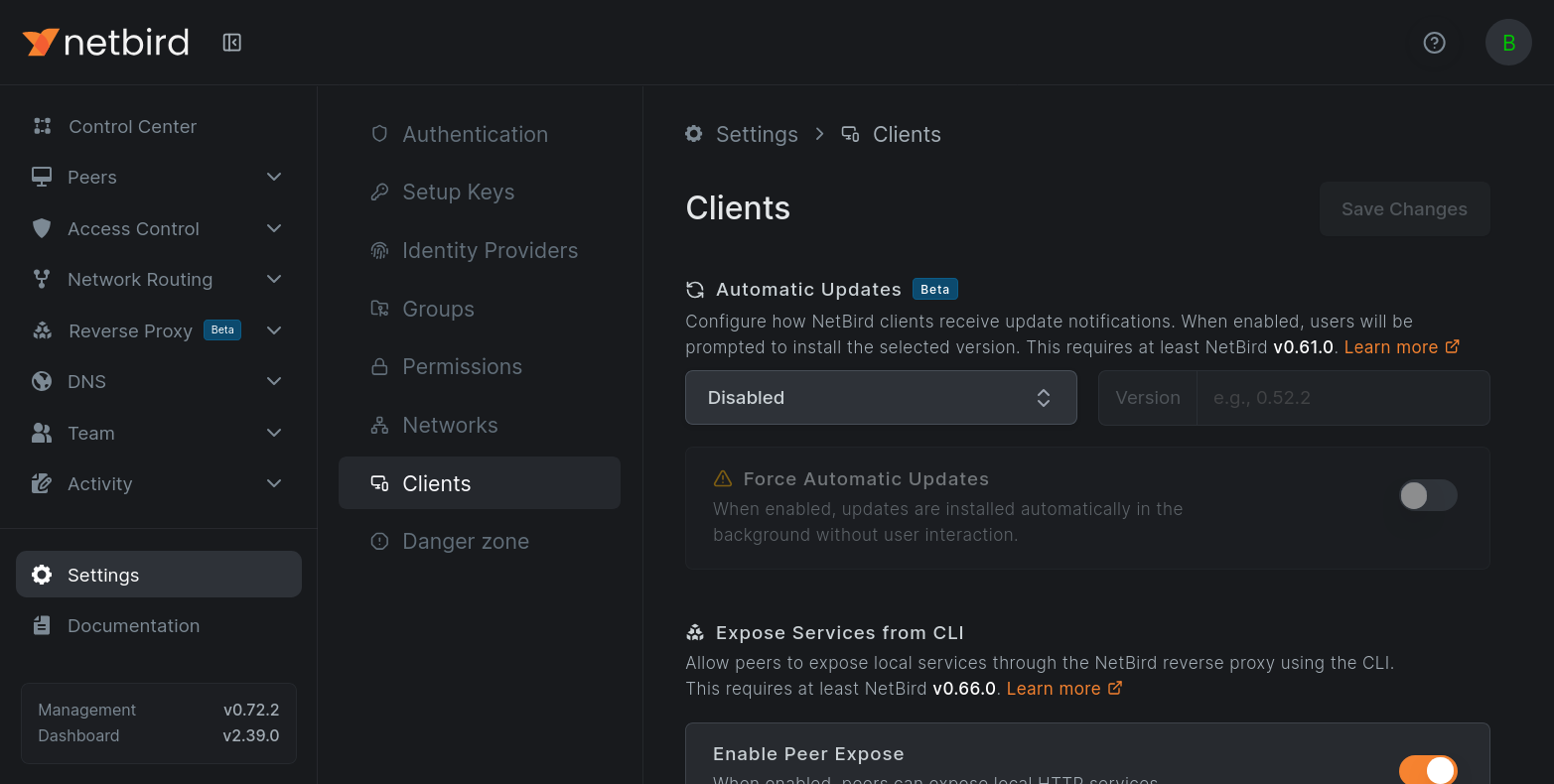
To enable client auto updates, navigate to Settings » Clients in your NetBird dashboard (app.netbird.io/settings on NetBird Cloud, or your own Management dashboard when self-hosting) and select an update method under Automatic Updates:
- Disabled - turn off automatic updates. This is the default.
- Latest Version - update clients to the latest stable release.
- Custom Version - pin clients to a specific version, entered without the
vprefix (e.g.,0.61.0).
Once enabled, NetBird clients will prompt the user to install the specified version if their current version is older. Clients are never downgraded: pinning a version older than a client's current version has no effect on that client.
Force Automatic Updates
When you need updates to be installed without user interaction, enable the Force Automatic Updates toggle. With this option, updates are installed automatically in the background without prompting the user, even when the NetBird UI is not running.
Force Automatic Updates requires NetBird version v0.67.0 or later on both the Management server and the clients.
Enabling Force Automatic Updates will restart the NetBird client during updates, which can temporarily disrupt active connections. Use with caution in production environments.
How it works
- Settings Sync: When a Peer connects to Management, it receives the current Automatic Updates settings. Connected Peers also receive setting changes immediately, without reconnecting.
- Version Check: The Peer will compare its current version with the version specified in the Automatic Updates settings. Peers following the latest version also re-check for new releases periodically (every 30 minutes) while running.
- Update Process:
- If the Peer is running an older version than specified, it will prompt the user to install the update via a system notification and an install entry in the NetBird tray menu.
- Client will then download the update package from the official NetBird repository.
- The NetBird background service, which runs with system privileges, installs the update and restarts the client to apply it.
When Force Automatic Updates is enabled, step 3.1 is skipped, the update is installed automatically in the background without user interaction.
Accepting a prompted update does not require the user to have administrator rights. The installation in step 3.3 is performed by the NetBird background service, which already runs with system privileges, not by the logged-in user. This is the same install mechanism as a forced update; the only difference is who triggers it. Manually running the installer instead (for example, from the tray's download link when Automatic Updates is off) is a per-machine install and does require elevation.
Supported Platforms
Automatic Updates are supported on the following platforms only:
- Windows (EXE and MSI installers)
- macOS (PKG installer only; Homebrew installations are not auto-updated)
Linux support is not available at this time due to the variety of distributions and package managers. A future release may include support for popular distributions.
Backward and Forward Compatibility
- If Management server version < v0.61.0, clients will not automatically update.
- If Management server version >= v0.61.0, NetBird clients with version >= v0.61.0 will automatically update according to the Automatic Updates settings.
Notes
- Automatic Updates will be set to "disabled" by default.
- If a peer cannot download or install the update (e.g., due to network issues), the client shows an error notification. Forced updates are retried automatically on subsequent update checks; prompted updates can be retried by the user from the tray menu.
- Update prompts and notifications require the NetBird UI to be running with Notifications enabled. Forced updates are installed by the NetBird service even when the UI is not running.
Get started
- Make sure to star us on GitHub
- Follow us on X
- Join our Slack Channel
- NetBird latest release on GitHub