

Keycloak on NetBird Cloud
Updated
You can use Keycloak as your Identity Provider with NetBird, but it will require some additional configuration steps. Keycloak is an open-source Identity and Access Management solution aimed at modern applications and services. It's one of the most popular self-hosted IDP solutions with extensive documentation and community support. Keycloak provides single sign-on, social login, user federation, fine-grained authorization, and supports OpenID Connect, OAuth 2.0, and SAML 2.0 protocols.
-
You need to create a new client
- Browse to the Clients section of the Administration console and click Create client.
-
Set the client type to OpenID Connect and enter any client ID and name for the client.
-
Click Next. Under Capability config, turn on Client authentication, leave Authorization off, and select only Standard flow under Authentication flow:

-
Click Next and fill the following fields:
Valid redirect URIs:
https://login.netbird.io/login/callback
Web origins:+
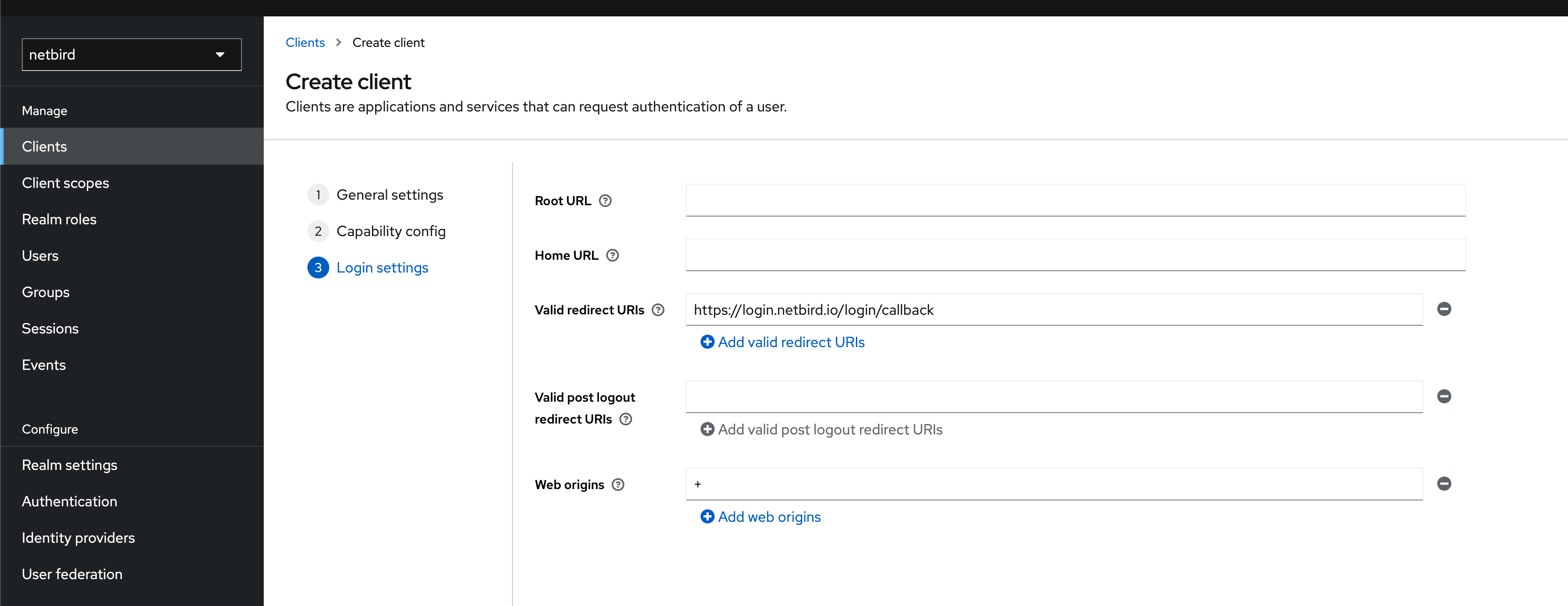
-
Click Save.
-
Next we need to retrieve the secret for the client, you can get that in the Credentials tab for the client:

- Then, share the following information with the NetBird support team at support@netbird.io:
- Client ID
- Keycloak URL
- Realm
- Client Secret
- Email domains for your users
We recommend using a secure channel to share the Client’s secret. You can send a separate email and use a secret sharing service like:
https://onetimesecret.com/en/
https://password.link/en